Red Hat Enterprise Linux System Administration

A practical Red Hat Enterprise Linux system administration reference covering the shell, file systems, users, SELinux, systemd, networking, firewalls, DNF, LVM, storage, virtualization, Podman, automation, image mode, troubleshooting, and performance from fundamentals to advanced operations.
RHEL administration requires clear separation between temporary and persistent state, operating-system and application behaviour, POSIX permissions and SELinux policy, and configured NetworkManager profiles versus the network state that is actually running. As of August 2026, the material follows public RHEL 10.2 documentation while older administration habits are identified in their historical context. The goal is to understand system state and change it safely rather than memorise commands.
The operating rule for 2026 is simple:
observe the state
find the cause
make the smallest change
verify the result
make the change persistent
Most RHEL administration failures do not come from forgetting a command. They come from confusing temporary and persistent state, the operating system and the application, POSIX permissions and SELinux policy, or a NetworkManager profile and the network state that is actually running.
Unit 1: System Foundations, Shell, and Files
1. System Administration with RHEL 10.2
Red Hat Enterprise Linux is designed for long-lived, supported systems where change is controlled. As of August 2026, RHEL 10.2 is the current minor release in the RHEL 10 line.
Much of the RHEL 7 administration model from 2016 still matters:
- Bash and GNU core tools
- users and groups
- POSIX file permissions
- systemd
- the journal and syslog
- SSH
- RPM
- LVM
- XFS
- SELinux
- firewalld
- NetworkManager
Some habits are now historical:
2016 approach                     2026 approach
-------------------------------   -----------------------------------------
yum                               dnf
ifcfg files                       NetworkManager keyfile profiles
network-scripts                   NetworkManager
network team / teamd              bonding
iptables-centered management      firewalld or nftables
Docker-centered explanation       Podman, Buildah, Skopeo
manual per-server changes         RHEL System Roles / Ansible
classic installation only         package mode + image mode
RHEL 10 no longer supports the old ifcfg profile format. NetworkManager stores native keyfile profiles under /etc/NetworkManager/system-connections/. The teamd service and libteam are removed; new link aggregation configurations use bonding. The standalone dhclient utility is also removed; NetworkManager uses its internal DHCP implementation.
The lesson is larger than the commands: an administrator should know the current management layer instead of memorizing old configuration files.
2. Shell and Command Line
Bash remains the normal interactive administration environment.
A command line has three basic parts:
command option argumentExample:
ls -lah /var/logThe ordinary shell prompt commonly ends in $; a root shell commonly ends in #. The symbol is not decoration. A mistake made as root can affect the entire machine.
Help system
Local documentation is often faster than a web search:
man systemctl
man sshd_config
man 5 fstab
command --help
Important manual sections:
1   user commands
5   file formats and configuration
8   administration commands
For example, man 5 sshd_config and man 8 sshd explain different layers of the same service.
To identify where a command comes from:
type -a ssh
command -v ssh
rpm -qf "$(command -v ssh)"
Completion and history
Tab completion reduces typing errors as well as keystrokes.
Tab         complete
Ctrl+r      search history
Ctrl+a      beginning of line
Ctrl+e      end of line
Ctrl+u      delete to the left
Ctrl+k      delete to the right
History is viewed with:
historyPasswords, tokens, and private keys should not be allowed to leak into shell history.
Pipes and redirection
Standard streams:
0   stdin
1   stdout
2   stderr
Examples:
command > output.txt
command >> output.txt
command 2> error.txt
command > output.txt 2>&1
A pipe connects one command's output to another command's input:
journalctl -u sshd | grep FailedCommon text tools include grep, cut, sort, uniq, tr, sed, awk, head, tail, wc, and less.
A useful rule: if one grep solves the problem, do not write a complicated awk program. Use awk when fields or structured transformations actually matter.
3. File System and Files
Linux exposes one directory tree. Local disks, logical volumes, and remote file systems are mounted into that tree.
Important directories:
/           root
/etc        system configuration
/var        variable data, logs, spool
/home       user home directories
/root       root home directory
/usr        applications, libraries, shared data
/opt        additional applications
/tmp        temporary data
/run        runtime state
/dev        device nodes
/proc       process and kernel view
/sys        device and kernel object view
/boot       kernel and boot data
/proc and /sys look like ordinary directories, but are virtual file systems provided by the kernel.
Paths
Absolute path:
/etc/ssh/sshd_configRelative path:
../logs/app.logSpecial forms:
.       current directory
..      parent directory
~       home directory
-       previous directory with cd
Basic file operations
pwd
ls -lah
cd /etc
mkdir -p /srv/app/data
cp source target
cp -a source/ backup/
mv old new
rm file
rmdir empty-dir
rm -rf is not a convenience feature. Especially as root, read the target again before pressing Enter.
Identify a file
Linux does not require file extensions:
file filename
stat filename
stat shows inode, size, ownership, and timestamps.
Search
By name:
find /etc -name '*.conf'By size:
find /var -type f -size +1GBy modification time:
find /var/log -type f -mtime -1By content:
grep -R "Listen" /etc/httpdfind is authoritative for the current tree. locate is faster when available, but depends on its index being current.
Links
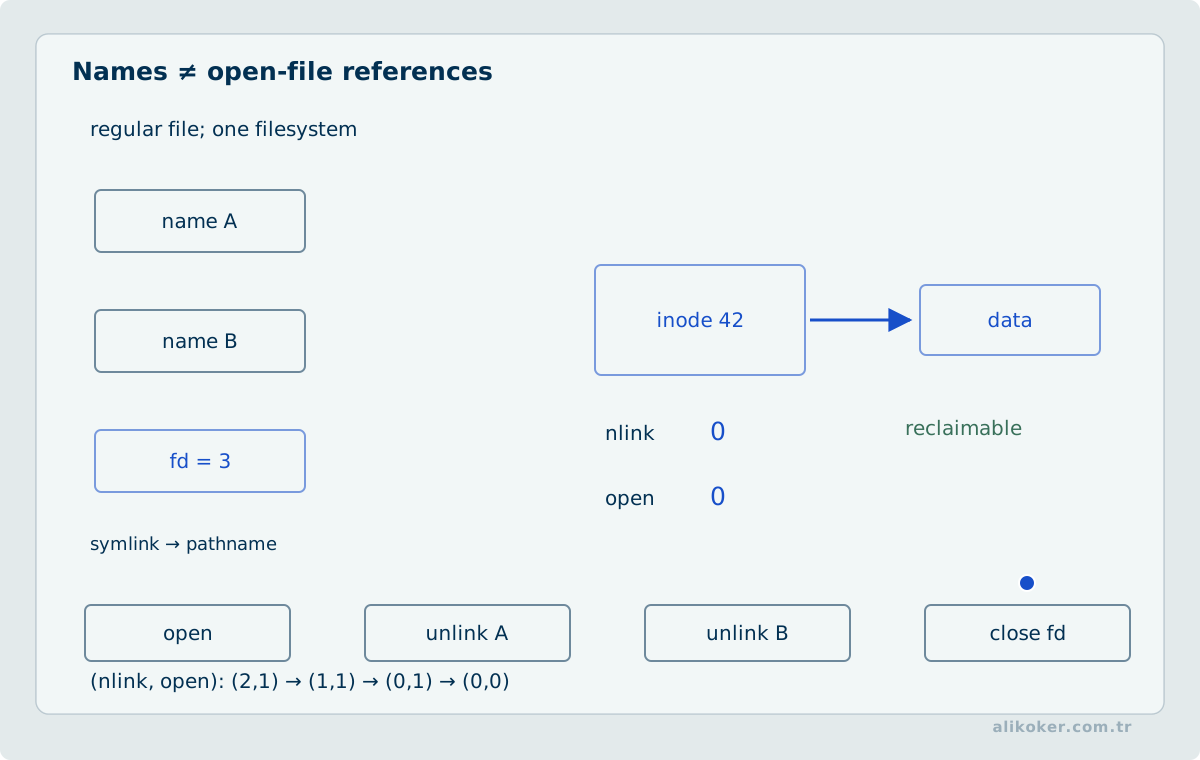
A hard link is another name for the same inode:
ln file hardlinkA symbolic link refers to another path:
ln -s /srv/app/current /opt/appHard links normally cannot cross file-system boundaries and are not used for directories. Symbolic links can cross file systems, but can become broken.
4. Text Files and Configuration
Linux administration is largely configuration management.
On manually managed systems, compare changes rather than editing blindly:
diff -u old.conf new.confIn managed environments, Git, Ansible, or another configuration-management system is preferable to accumulating arbitrary .bak files.
Editor
Minimal vi knowledge remains useful even in rescue environments:
i       insert mode
Esc     command mode
:w      write
:q      quit
:wq     write and quit
:q!     quit without saving
/search search text
Other editors are fine, but basic vi literacy is a useful common denominator.
Configuration-change rule
When a service provides a syntax test, validate before restarting it:
sshd -t
nginx -t
apachectl configtest
Then prefer reload when reload is sufficient:
systemctl reload serviceA restart can terminate active connections. Do not restart merely because it is familiar.
Unit 2: Identity, Privilege, and SELinux
5. Users, Groups, and Privilege
Linux identities are numeric. User names map to UIDs; group names map to GIDs.
Core local files:
/etc/passwd
/etc/shadow
/etc/group
/etc/gshadow
Useful queries:
id alice
getent passwd alice
getent group developers
getent is usually better than reading /etc/passwd directly in enterprise environments because it can also query SSSD-backed identity sources.
User management
useradd alice
passwd alice
usermod -aG wheel alice
userdel alice
Lock and unlock:
usermod -L alice
usermod -U alice
Account aging:
chage -l aliceService accounts that do not need interactive access can use:
/usr/sbin/nologinsudo instead of daily root use
Raise privilege only when it is needed:
sudo command
sudo -i
Edit sudo policy with:
visudoSite-specific fragments can be stored under:
/etc/sudoers.d/Least privilege means granting the required operation, not granting root because it is easier.
6. File Permissions and ACLs
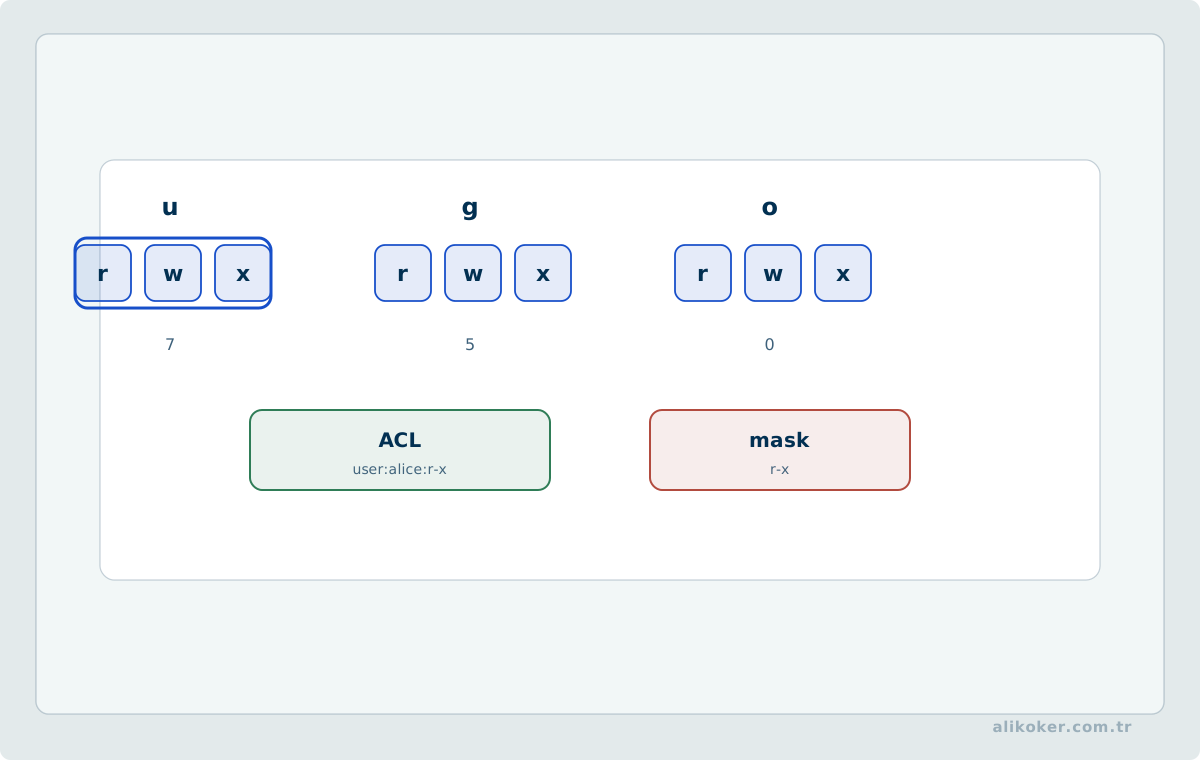
Classic permissions have three subject classes:
u   owner
g   group
o   others
Permissions are:
r   read
w   write
x   execute
For example:
-rwxr-x---is numeric mode 750.
chmod 750 script.sh
chown alice:developers file
chgrp developers file
Directory permissions
Directory permissions have different semantics:
r   list names
w   create or remove directory entries
x   traverse the directory and access contained objects
A directory with only r is therefore not necessarily usable.
umask
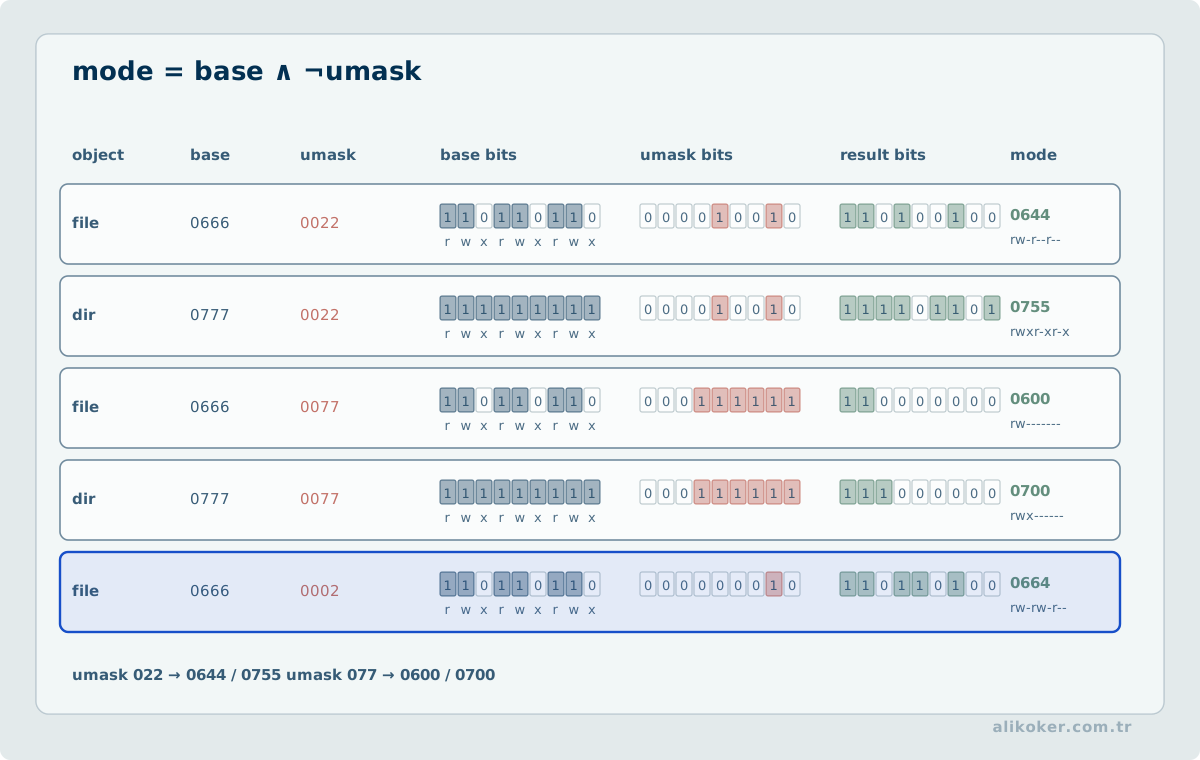
Files are commonly derived from mode 666, directories from 777, and umask removes permission bits:
umask
umask 027
Special bits
The important special bits are setuid, setgid, and sticky.
For a shared group directory:
chmod 2770 /srv/teamThe setgid bit causes new files to inherit the directory's group.
A shared writable directory such as /tmp commonly uses sticky mode:
1777so users cannot remove one another's files merely because the directory is writable.
ACL
When owner-group-other is not expressive enough:
setfacl -m u:alice:rw file
getfacl file
Default ACL:
setfacl -m d:g:developers:rwx /srv/projectACLs solve real access-control cases, but excessive ACL use makes permissions hard to reason about. Prefer a clear group model when it is sufficient.
7. SELinux
SELinux is not a replacement for file permissions. It is another authorization layer.
Access requires both:
POSIX permissions allow
        +
SELinux policy allows
        =
access is possible
Check mode:
getenforce
sestatus
The normal production mode is Enforcing.
Disabling SELinux permanently because an application fails is not a solution.
Context
Inspect a file context:
ls -Z /var/www/htmlThe general form is:
user:role:type:levelFor routine administration, the type component is most frequently relevant.
A web content type can be:
httpd_sys_content_tPersistent correction
chcon changes a label directly, but the durable approach is to define the expected mapping and restore it:
semanage fcontext -a -t httpd_sys_content_t '/srv/web(/.*)?'
restorecon -Rv /srv/web
restorecon applies the label expected by policy.
AVC records
When access is denied:
ausearch -m AVC,USER_AVC -ts recentand inspect the journal.
Troubleshoot in order:
1. are POSIX permissions correct?
2. is the process running as the expected user?
3. is the file context correct?
4. is the port context correct?
5. is an SELinux boolean required?
6. is a new local policy really necessary?
setenforce 0 can be useful briefly for diagnosis. "It works in permissive mode, so disable SELinux" is not production engineering.
Unit 3: Processes, Services, Scheduling, and Logs
8. Processes and Resources
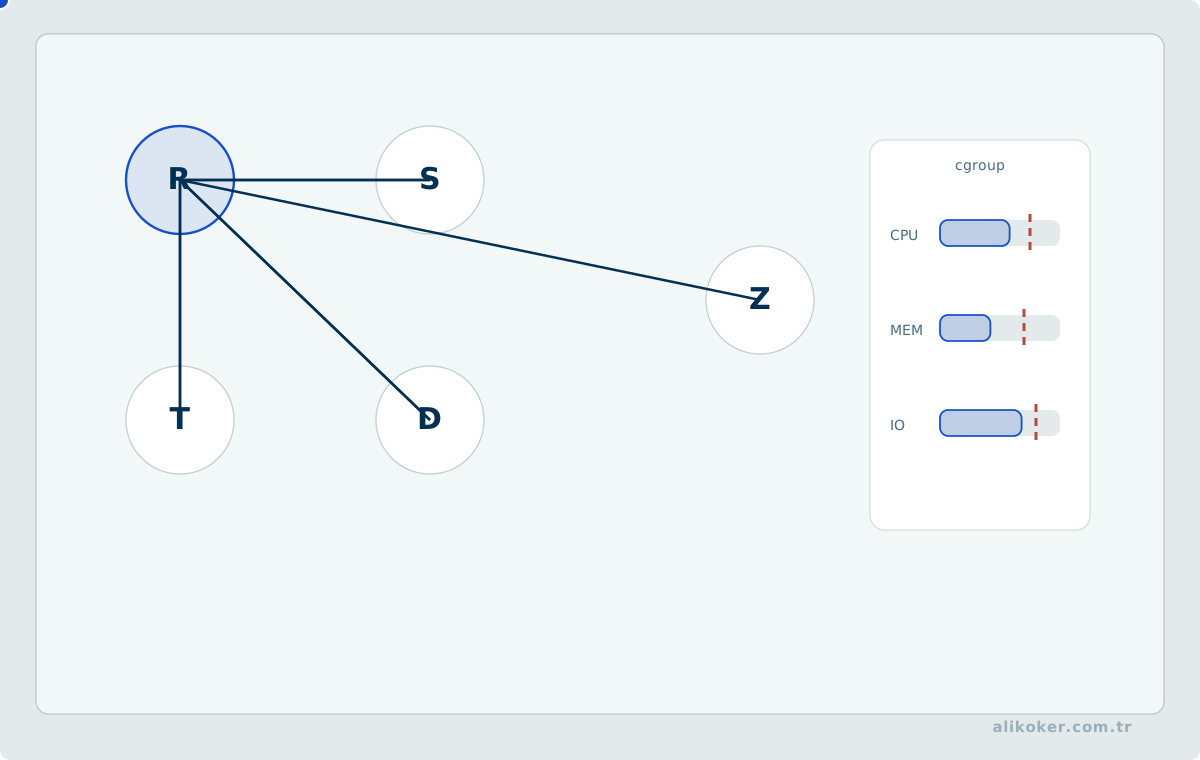
A process is a running instance of a program.
ps aux
ps -ef
pgrep sshd
top
For cgroup-oriented resource visibility:
systemd-cgtopUseful system tools include:
free -h
vmstat 1
iostat
sar
when the relevant packages are installed.
Load average
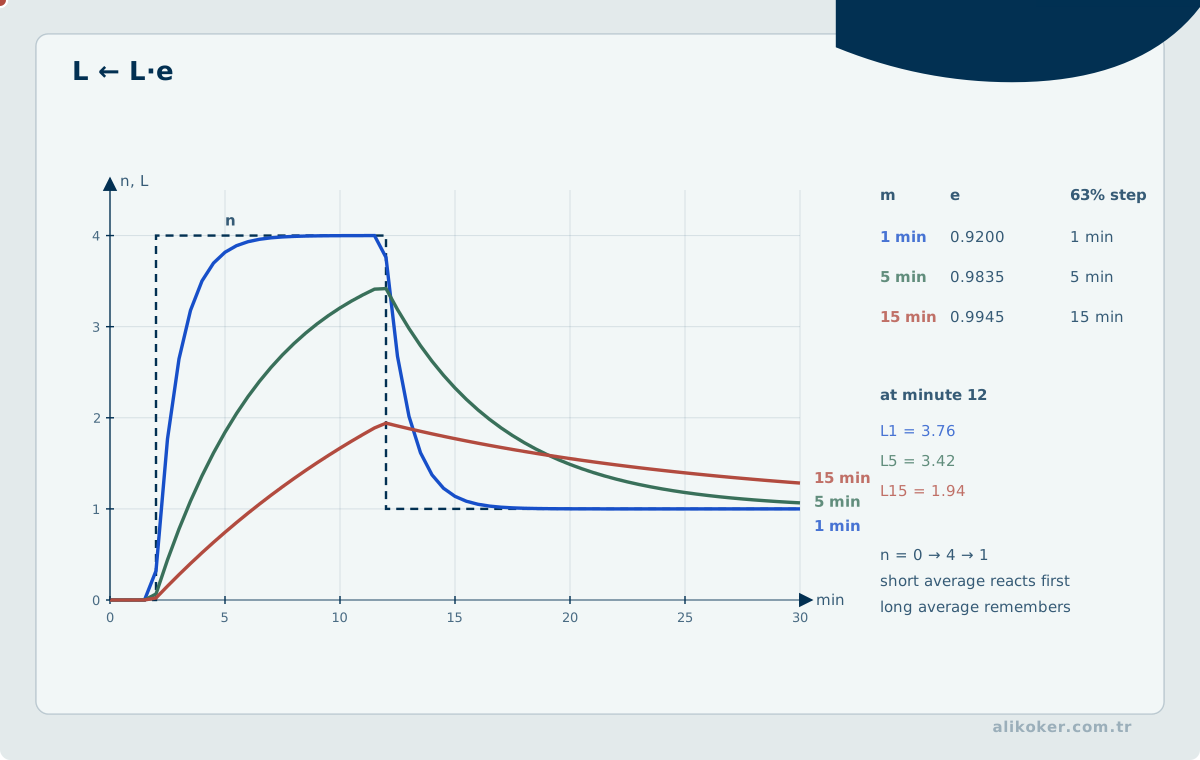
uptime and top show 1-, 5-, and 15-minute load averages.
Load is not CPU utilization. Linux load can include runnable tasks and tasks blocked in uninterruptible I/O wait.
Therefore:
high load -> insufficient CPUis not a valid automatic conclusion.
Start with:
top
vmstat 1
iostat -xz 1
and separate CPU pressure, memory pressure, and I/O latency.
Signals
kill PID
kill -TERM PID
kill -KILL PID
SIGTERM gives the process a chance to shut down cleanly. SIGKILL does not.
Normal order:
TERM
wait
KILL only if necessary
OOM
When memory is exhausted, the kernel can terminate a process through the OOM killer.
Start with:
journalctl -kA process that "died by itself" can be a symptom of system-wide memory pressure rather than an application defect.
9. systemd and Service Management
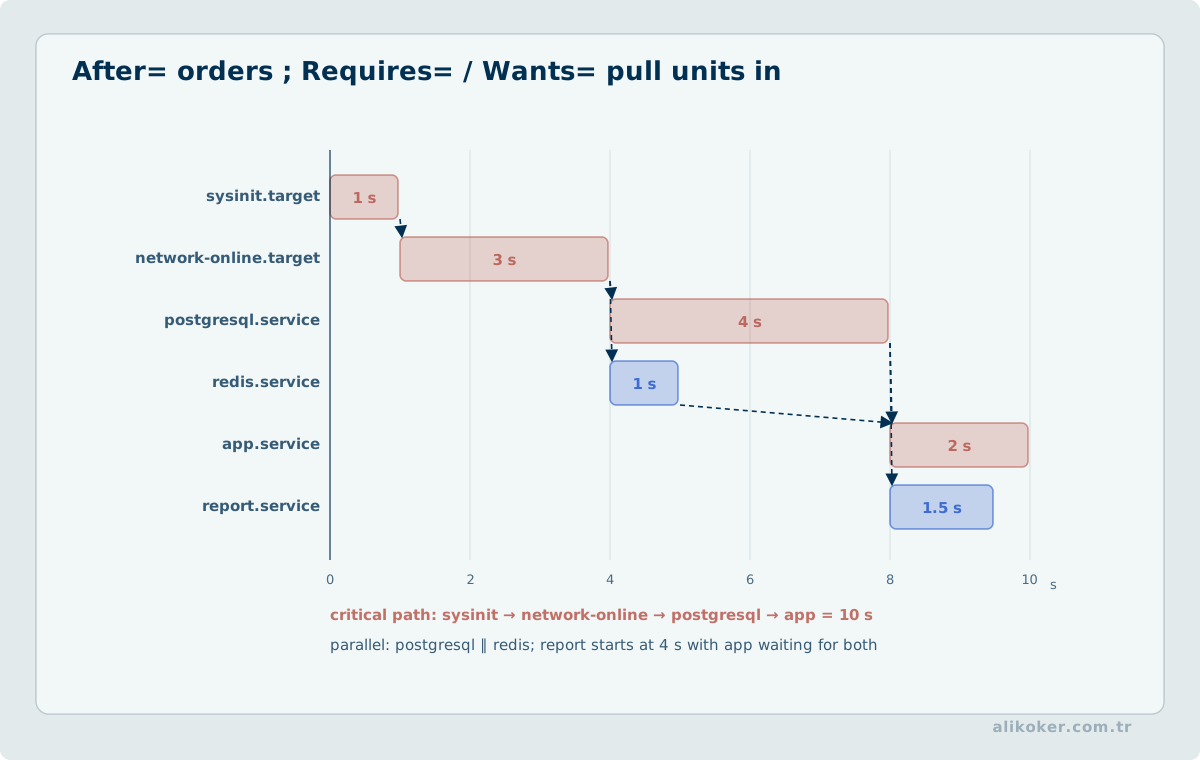
systemd, introduced into RHEL before the 2016 material, remains the core service-management model.
Status:
systemctl status sshdStart, stop, restart, reload:
systemctl start sshd
systemctl stop sshd
systemctl restart sshd
systemctl reload sshd
Boot policy:
systemctl enable sshd
systemctl disable sshd
systemctl enable --now sshd
Remember:
start      run now
enable     start on future boots
A service can be running but disabled, or enabled but currently stopped.
Unit types
Common unit types:
.service
.socket
.timer
.mount
.target
.path
Inspect a unit:
systemctl cat sshd
systemctl list-dependencies sshd
Overrides
Do not edit distribution files under /usr/lib/systemd/system/ directly.
Use a drop-in:
systemctl edit serviceThen:
systemctl daemon-reload
systemctl restart service
Targets
Targets replaced the old runlevel-oriented management model.
Common targets:
multi-user.target
graphical.target
rescue.target
emergency.target
Inspect and change the default:
systemctl get-default
systemctl set-default multi-user.target
RHEL 10 uses the unified cgroups v2 model; service and workload resource control should be understood through systemd and cgroups rather than legacy cgroups v1 assumptions.
10. Scheduled Work

at is still useful for one-time jobs, and cron remains suitable for simple recurring work. systemd timers provide a more visible service-integrated alternative.
List timers:
systemctl list-timersA timer typically pairs two units:
backup.service
backup.timer
Example:
[Unit]
Description=Daily backup

[Timer]
OnCalendar=daily
Persistent=true

[Install]
WantedBy=timers.target
Persistent=true can cause a missed run to execute after the system becomes available again.
A practical distinction:
simple user job                 cron
job tied to service lifecycle   systemd timer
central multi-host scheduling   automation platform
11. Logs and Time
Log analysis is central to system administration.
RHEL commonly uses both:
systemd-journald
rsyslog
Journal examples:
journalctl
journalctl -u sshd
journalctl -b
journalctl -b -1
journalctl -k
journalctl --since "2026-08-20 10:00" --until "2026-08-20 11:00"
journalctl -f
journalctl -p warning
Persistent journal
Depending on configuration, journal data can be volatile under /run/log/journal or persistent under /var/log/journal.
Enterprise systems should consider persistent logging when pre-reboot evidence matters.
rsyslog
Traditional files can still be useful:
/var/log/messages
/var/log/secure
/var/log/maillog
/var/log/cron
Do not assume every event is present in those files. Service configuration and journald routing matter.
Log rotation
Logs cannot grow without bound. logrotate rotates files based on time or size.
When investigating logging problems, also check storage:
df -h
du -sh /var/log/*
journalctl --disk-usage
Time synchronization
Correct time is required to correlate events across systems.
timedatectl
chronyc tracking
chronyc sources -v
Chrony is the standard time-synchronization stack in RHEL.
Clock drift can break:
- log correlation
- Kerberos
- certificate validation
- distributed transactions
- forensic timelines
Time is therefore a security and operations dependency, not a cosmetic setting.
Unit 4: Remote Access, Networking, Firewall, and Packages
12. SSH
OpenSSH is the normal remote administration stack.
Connect:
ssh user@hostTransfer files:
scp file user@host:/path/
sftp user@host
For directory synchronization and efficient repeated copying:
rsync -aHAX --info=progress2 source/ user@host:/target/Public-key authentication
Generate a key:
ssh-keygen -t ed25519Install the public key:
ssh-copy-id user@hostThe private key is never shared.
Basic hardening principles:
avoid direct password-based root login
prefer key authentication
restrict unnecessary users
disable forwarding features that are not needed
limit the network source with firewall policy
Configuration
Main file:
/etc/ssh/sshd_configAdditional configuration can be placed under sshd_config.d, depending on the installed build and policy.
Validate before applying:
sshd -t
systemctl reload sshd
When changing SSH remotely, keep the existing session open until a second connection proves that the new configuration works.
13. Network Management
NetworkManager is the central network-management layer in RHEL 10.
Inspect state:
nmcli device status
nmcli connection show
ip address
ip route
Activate a profile:
nmcli connection up PROFILEStatic IPv4
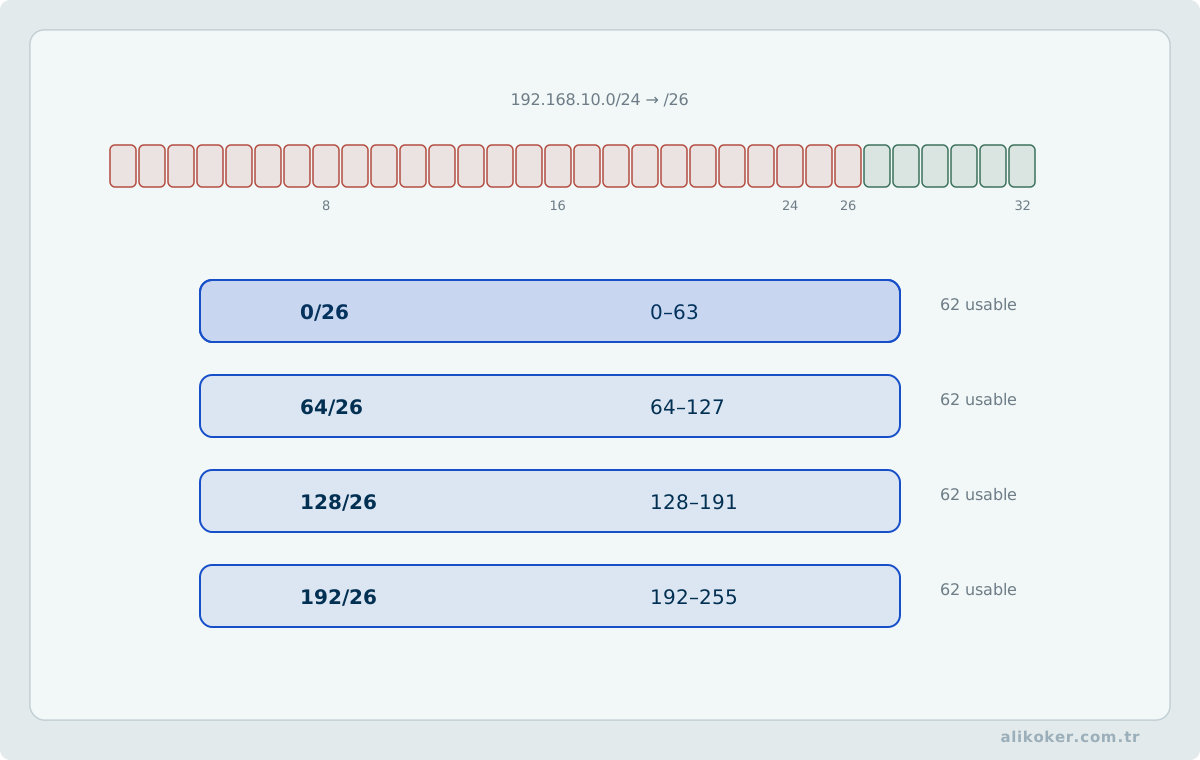
Example:
nmcli connection modify ens192 \
  ipv4.method manual \
  ipv4.addresses 192.0.2.10/24 \
  ipv4.gateway 192.0.2.1 \
  ipv4.dns "192.0.2.53 192.0.2.54"

nmcli connection up ens192
Name-resolution inspection:
resolvectl status
getent hosts example.com
When NetworkManager owns resolver configuration, manually editing /etc/resolv.conf can create configuration drift.
Keyfile profiles
RHEL 10 stores NetworkManager profiles under:
/etc/NetworkManager/system-connections/The older:
/etc/sysconfig/network-scripts/ifcfg-*format is no longer supported as the native RHEL 10 configuration format.
Bonding
Multiple physical links can be combined into one logical interface.
RHEL 10 removed teamd; use kernel bonding for new configurations.
Goals can include:
- link redundancy
- load distribution in suitable modes
- one logical interface
The bond mode must match the switch-side design. LACP-based designs require compatible configuration on both ends.
IPv6
IPv6 is a normal part of current RHEL networking.
ip -6 address
ip -6 route
Link-local addresses use:
fe80::/10Do not disable IPv6 merely because no public IPv6 service is planned. Many libraries and services assume dual-stack behavior; first understand the dependency.
Troubleshooting order
1. is link present?
2. is the interface up?
3. is the address correct?
4. is the route correct?
5. is the gateway reachable?
6. does DNS work?
7. is the service listening?
8. does the firewall allow it?
9. does SELinux allow it?
Useful tools:
ip link
ip addr
ip route
ping
tracepath
ss -lntup
nmcli
dig
getent hosts
tcpdump
ifconfig and netstat remain useful when reading older systems, but ip and ss are the current baseline.
14. Firewall
For normal host administration, RHEL uses firewalld; direct nftables is appropriate when lower-level control is required.
Do not let two independent management layers compete over the same ruleset.
firewalld
firewall-cmd --state
firewall-cmd --get-active-zones
firewall-cmd --list-all
Open a known service:
firewall-cmd --add-service=https --permanent
firewall-cmd --reload
A named service documents intent better than an unexplained numeric port.
The runtime and permanent configurations are different:
runtime      current running rules
permanent    rules after reload or boot
A safe workflow is to test a runtime rule first, verify behavior, then make it persistent.
nftables
Inspect the low-level ruleset:
nft list rulesetnftables is the unified framework that replaced the old management families built around:
iptables
ip6tables
arptables
ebtables
ipset
The important operational question is ownership. If firewalld owns a ruleset, changing the same rules manually with nft creates drift.
15. Package Management
RPM is the package format and low-level database. DNF provides dependency and repository management.
RPM queries:
rpm -q openssh-server
rpm -qi openssh-server
rpm -ql openssh-server
rpm -qf /usr/sbin/sshd
DNF:
dnf search nginx
dnf info nginx
dnf install PACKAGE
dnf remove PACKAGE
dnf upgrade
dnf repolist
Install a local RPM through DNF when dependencies should be resolved:
dnf install ./package.rpmDirect rpm -i is not the normal choice when DNF can solve dependencies.
Repository model
Important RHEL 10 content repositories include:
BaseOS
AppStream
CodeReady Linux Builder
Supplementary
Inspect enabled repositories:
dnf repolistUpdate discipline
"Are updates available?" is only the first question.
Evaluate:
security impact
application dependency
kernel update
service restart requirements
reboot requirements
rollback plan
maintenance window
A package can be updated on disk while a running process still holds the old library in memory. Package installation alone does not prove that the vulnerability or bug is no longer active in the running workload.
Unit 5: Storage, File Systems, and Backup
16. Disks, File Systems, and LVM
Inspect block devices:
lsblk -f
blkid
Capacity:
df -hT
du -sh /path
df reports file-system allocation. du reports visible files in a directory tree. A deleted file that is still open can make the two disagree:
lsof +L1XFS
XFS is the default local file system in RHEL 10.
Its strengths include:
- large files and file systems
- high-concurrency I/O
- metadata journaling
- online growth
Critical limitation:
XFS cannot be shrunk.Do not design an LVM layout on the assumption that an XFS volume can later be reduced in place.
ext4
ext4 remains a mature supported local file system. It can be appropriate for smaller or compatibility-oriented workloads and differs from XFS in resize behavior.
Unless there is a specific reason, Red Hat recommends XFS as the normal local file system.
fstab
Persistent mounts are defined in:
/etc/fstabUUIDs are usually more stable than device names:
blkidExample:
UUID=... /srv/data xfs defaults 0 0Test after editing instead of discovering a syntax error during the next boot:
mount -aA broken fstab entry can interfere with boot.
LVM
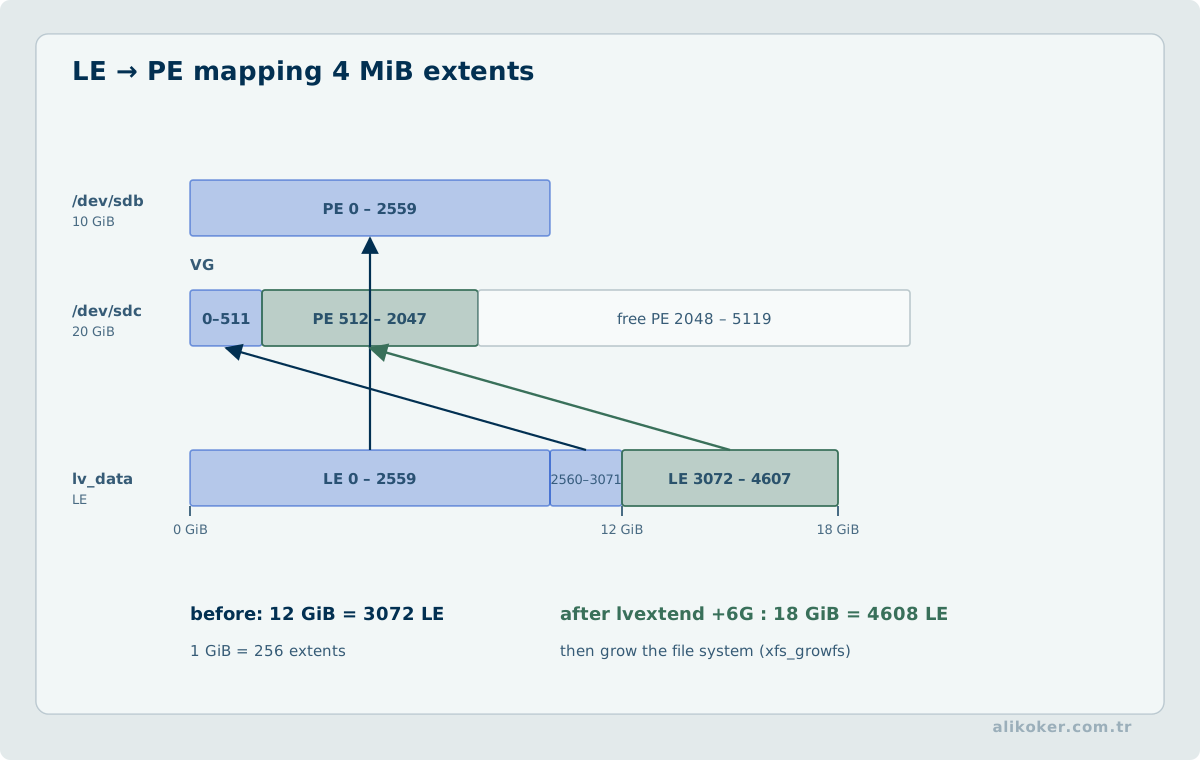
Layers:
disk / partition
      ↓
PV
      ↓
VG
      ↓
LV
      ↓
filesystem
Inspect:
pvs
vgs
lvs
Example:
pvcreate /dev/sdb
vgcreate vgdata /dev/sdb
lvcreate -L 100G -n lvdata vgdata
mkfs.xfs /dev/vgdata/lvdata
Grow:
lvextend -L +20G /dev/vgdata/lvdata
xfs_growfs /mountpoint
Some LVM commands can grow the file system in the same operation, but the logical volume and the file system are still different layers.
Thin provisioning and VDO
Thin provisioning allocates physical capacity on demand. It permits overcommit, so pool usage must be monitored; an exhausted thin pool can affect every dependent volume.
VDO provides data-reduction functions such as compression and deduplication and is integrated with LVM-based storage management.
Data reduction is not free capacity. It consumes CPU, memory, and metadata.
Stratis
Stratis provides a higher-level storage-management interface over technologies including XFS and LVM.
Learn block devices, PV/VG/LV, and file systems first. Stratis is an abstraction over those concepts, not a replacement for understanding them.
Encryption
Use LUKS2 for block-device encryption.
Enterprise unlock designs can include:
- Clevis
- NBDE
- TPM2
- remote-attestation-based unlocking
RHEL 10.2 adds Clevis integration for remote attestation through a Trustee Key Broker Service. Automatic unlocking improves operations only when key release policy and failure behavior are understood.
17. Remote Storage and File Sharing
NFS
NFS is the normal Unix/Linux network file-sharing protocol.
Server-side concepts include:
export
client
permission
identity mapping
firewall
SELinux
Inspect exports:
exportfs -vClient mount:
mount -t nfs server:/export /mnt/dataNFSv4 is the modern baseline.
Kerberos protection can use:
krb5
krb5i
krb5p
krb5p also protects confidentiality.
SMB
Samba provides SMB interoperability with Windows environments.
Client example:
mount -t cifs ...Access depends on more than POSIX file modes. Share permissions, identity, SELinux, and firewall policy all participate.
iSCSI and NVMe-oF
File access and block access are different:
NFS/SMB      remote file system
iSCSI        remote block device
NVMe-oF      NVMe block access over a fabric/network
RHEL 10 supports enterprise storage paths including:
- iSCSI
- Fibre Channel
- NVMe/RDMA
- NVMe/FC
- NVMe/TCP
- multipathing mechanisms appropriate to the transport
Do not assume the same multipath stack applies to every NVMe transport. RHEL 10 uses native NVMe multipathing for supported NVMe fabrics scenarios, and DM Multipath is not a generic replacement for it.
18. Web and Database Services
The Apache HTTP Server, DNS, and database-service material from the older curriculum remains useful because the administration pattern is stable.
For any network service ask:
is the package installed?
is the configuration valid?
is the service running?
is the port listening?
does the firewall allow it?
does SELinux allow it?
does name resolution point to the right place?
what do the logs say?
Apache example:
dnf install httpd
apachectl configtest
systemctl enable --now httpd
ss -lntp
firewall-cmd --add-service=http --permanent
firewall-cmd --reload
journalctl -u httpd
The service-specific commands change for Nginx, MariaDB, DNS, or a Java application. The diagnostic model does not.
19. Archiving, Copying, and Backup
Create and extract archives:
tar -cf backup.tar directory/
tar -xf backup.tar
Compression:
tar -czf backup.tar.gz directory/
tar -cJf backup.tar.xz directory/
For large production backups, compression is a trade-off among CPU, elapsed time, network bandwidth, and restore objectives.
Remote copy:
rsync -aHAX source/ host:/backup/-a does not preserve every possible metadata class. ACL and extended-attribute requirements can require -A and -X.
A backup is more than a file that was created.
A real backup is:
created
integrity-checked
stored in a separate failure domain
restore-tested
A snapshot is not automatically a backup. If it shares the same storage failure domain, the same failure can destroy both the source and the snapshot.
Unit 6: Virtualization, Containers, and Automation
20. Virtualization
The RHEL virtualization stack is based on:
KVM
QEMU
libvirt
Basic tools:
virsh list --all
virsh dominfo VM
virsh start VM
virsh shutdown VM
The RHEL web console can provide graphical management.
Capacity planning must consider:
vCPU
RAM
NUMA
storage latency
I/O queues
network
overcommit
A slow VM does not automatically need more CPU. Storage latency, NUMA placement, and contention are common hidden causes.
TuneD provides workload profiles such as:
virtual-guest
virtual-host
A profile is not a substitute for measurement.
21. Containers
RHEL 10's native container toolchain includes:
Podman
Buildah
Skopeo
The responsibilities differ:
Podman    run and manage containers and pods
Buildah   build container images
Skopeo    inspect and copy images and registries
Podman does not require a central daemon and supports rootless operation.
Example:
podman pull registry.redhat.io/ubi10/ubi
podman run --rm -it registry.redhat.io/ubi10/ubi bash
podman ps
podman images
Prefer rootless containers when root privilege is not required.
Containers with systemd
For new configurations, Quadlet is the preferred way to describe Podman workloads that should be managed by systemd.
The model is:
container definition
      ↓
Quadlet
      ↓
systemd service
      ↓
systemctl
This keeps service lifecycle under the same operating-system management model instead of creating a separate daemon-centric control plane.
22. Cockpit Web Console
The command line remains the universal administration interface. A graphical interface can still be useful for observation and selected operations.
RHEL's web console is based on Cockpit.
Install and enable:
dnf install cockpit
systemctl enable --now cockpit.socket
Typical functions include:
- service management
- users
- networking
- firewall
- storage
- logs
- virtual machines
- SELinux
- software updates
- diagnostic reports
The web console is not a separate administration universe. It works through the same system services, so CLI changes should be visible there as well.
Use a normal user with sudo rather than routine direct root login.
23. Automation
Manual work on one server is a learning and troubleshooting skill. Repeating the same change across dozens of servers is an automation problem.
RHEL System Roles provide supported Ansible-based automation patterns.
The goal is not:
send the same shell command to every serverbut:
describe desired state
        ↓
apply it repeatably
        ↓
reduce configuration drift
Example:
- hosts: web
  become: true
  roles:
    - redhat.rhel_system_roles.timesync
System Roles cover areas such as:
- networking
- time synchronization
- firewall
- SELinux
- storage
- journald
- sudo
- SSH
- Cockpit
A useful distinction:
one server + one change        CLI
many servers + repeated state  automation
Putting a shell command into Ansible is not enough. Good automation expresses the desired final state and is idempotent: running it again should not create unnecessary changes.
24. Image Mode and bootc
RHEL 10 supports an image-based operating-system lifecycle alongside classic package-based administration.
Image mode follows this model:
operating system
      ↓
OCI image
      ↓
build and test
      ↓
registry
      ↓
deploy/update with bootc
Instead of mutating each host package by package, the operating-system composition is built and tested as an image.
Good use cases include:
- fleets of similar systems
- edge deployments
- immutable-infrastructure patterns
- CI/CD-driven operating-system delivery
- environments where the whole OS composition should be tested as one artifact
Not every server needs image mode. Classic package mode remains a primary administration model.
The difference is:
package mode   change the running system
image mode     change the image, move the system to that image
The operational benefit is consistency. The cost is a different build, registry, rollback, and deployment workflow.
Unit 7: Secure Operations, Troubleshooting, and Performance
25. Secure System Administration
Security is a stack of controls rather than one product:
identity
   ↓
sudo
   ↓
file permissions
   ↓
SELinux
   ↓
service configuration
   ↓
firewall
   ↓
encrypted communication
   ↓
logging
   ↓
updates
   ↓
backup and recovery
Baseline rules:
- Do not use root for routine work.
- Prefer key-based SSH authentication.
- Disable unused services.
- Do not open unused ports.
- Do not solve SELinux problems by disabling SELinux.
- Install packages from controlled repositories.
- Keep time synchronized.
- Consider centralized logs.
- Test restores, not only backup creation.
- Make changes reproducible through automation when repetition begins.
System-wide cryptographic policy
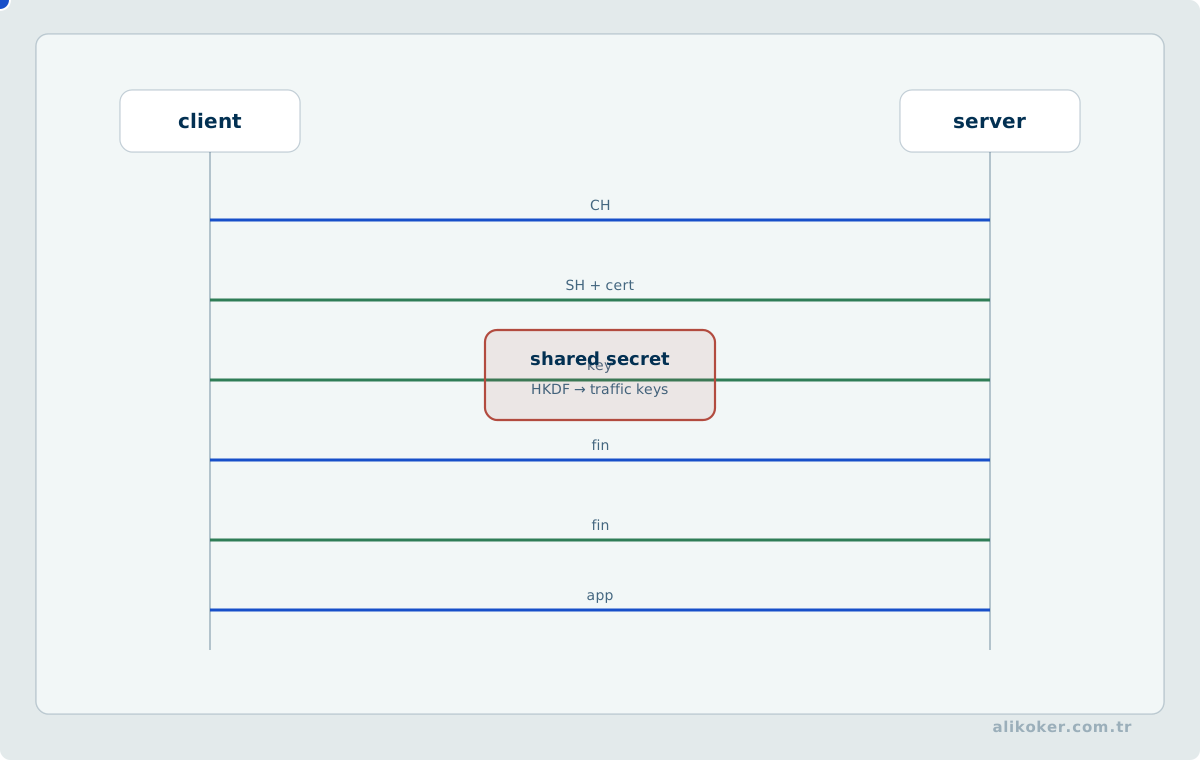
RHEL applies system-wide cryptographic policy. Applications should use that policy when possible instead of each carrying an independent weak-algorithm list.
Compatibility requests involving:
- SHA-1
- small RSA keys
- old TLS versions
- obsolete SSH algorithms
must be treated as security decisions.
Lowering the cryptographic policy of an entire server because one old device cannot connect is usually the wrong scope of change.
26. Troubleshooting
Troubleshooting is evidence collection, not a list of commands.
A useful sequence is:
symptom
   ↓
scope
   ↓
last change
   ↓
logs
   ↓
resource state
   ↓
dependencies
   ↓
smallest hypothesis
   ↓
test
   ↓
fix
   ↓
verify
Service does not start
Begin with:
systemctl status service
journalctl -u service -b
systemctl cat service
Then inspect:
- configuration validation
- service user and group
- file permissions
- SELinux
- port conflicts
- dependencies
Disk is full
df -hT
df -ih
du -xhd1 /
lsof +L1
journalctl --disk-usage
If df is full while du is unexpectedly small, think about deleted-but-open files or mount topology.
Network is down
ip link
ip addr
ip route
nmcli device
nmcli connection
ss -lntup
firewall-cmd --list-all
Then:
ping gateway
getent hosts hostname
tracepath target
tcpdump -ni interface
Do not jump to DNS before verifying address and route, and do not jump to the firewall before verifying that the service is listening.
SSH does not work
Server:
sshd -t
systemctl status sshd
ss -lntp
journalctl -u sshd
firewall-cmd --list-services
Client:
ssh -vvv user@hostThe verbose client trace often separates name resolution, TCP connection, host-key verification, authentication, and session setup.
SELinux is suspected
getenforce
ls -Z path
ausearch -m AVC -ts recent
Find the actual AVC record before weakening policy.
27. Diagnostic and Support Data
During a failure, isolated command output is often not enough. The surrounding system state matters.
Red Hat's sos tools collect configuration and diagnostic data into support archives.
A support archive can contain:
- personal data
- private keys or key references
- application secrets
- internal addressing
- log content
Diagnostic data therefore has its own security classification. Collecting a support bundle does not make it safe to distribute without review.
28. Performance Management
Tune after measurement.
Wrong order:
change sysctl
change TuneD profile
change I/O scheduler
measure afterward
Better order:
define the workload
      ↓
measure a baseline
      ↓
find the bottleneck
      ↓
make one change
      ↓
measure again
Important signals:
CPU utilization and run queue
memory pressure
swap activity
disk latency and IOPS
network throughput and loss
application latency
Useful tools:
top
vmstat
iostat
pidstat
sar
ss
ethtool
perf
Availability depends on installed packages.
TuneD offers predefined profiles, but a profile name is not evidence that the workload is faster. Measure before and after.
29. What Remained and What Changed from 2016 to 2026
Durable knowledge:
Bash
file-system hierarchy
users and groups
chmod/chown
processes and signals
systemd
SSH
journal
RPM
LVM
XFS
SELinux
NFS
DNS
HTTP
Knowledge that must be updated:
yum                         -> dnf
ifcfg                       -> NetworkManager keyfile
network-scripts             -> NetworkManager
teamd                       -> bonding
ifconfig/netstat            -> ip/ss
iptables-centered admin     -> firewalld/nftables
manual per-host changes     -> System Roles/Ansible
Docker assumption           -> Podman ecosystem
classic installation only   -> package mode + image mode
Old commands do not become useless knowledge. Legacy production systems remain in service for years.
An administrator should be able to:
read the old systemwithout:
building the new system with obsolete methods30. Short System Administrator Checklist
When opening a new server:
cat /etc/redhat-release
uname -r
timedatectl
ip addr
ip route
nmcli connection show
df -hT
lsblk -f
free -h
systemctl --failed
journalctl -p warning -b
getenforce
firewall-cmd --get-active-zones
dnf repolist
When deploying a service:
install the package
configure it
validate the configuration
enable/start it
verify the listening port
open the firewall
verify SELinux
test remotely
check logs
verify again after reboot
Before a change:
know the blast radius
know the rollback path
record the current state
After a change:
did the command succeed?       not enough
is the service running?        not enough
does the function actually work?
does it survive reboot?
are the logs clean?
The last question is always about behavior.
31. Core Distinctions for Exams and Operations
**start and enable are not the same.** The first changes current runtime state; the second changes boot policy.
**reload and restart are not the same.** If reload is supported, it usually disturbs active workloads less.
**df and du do not measure the same thing.** One reports file-system allocation; the other walks visible files.
POSIX permissions and SELinux are different layers. Both must permit access.
An open firewall does not prove a service is running. Check the listening socket first.
A listening port does not prove remote reachability. Routing, firewall, SELinux, and application policy still matter.
A NetworkManager profile is not the same as running interface state. A correct profile can exist without being active.
Runtime and permanent firewalld rules are different. The difference appears after reload or reboot.
RPM and DNF are different layers. RPM is the package format and low-level database; DNF manages repositories and dependencies.
LVM and the file system are different layers. Growing an LV does not automatically mean the file system is larger unless the command also performs that operation.
A snapshot is not a backup. It can share the same failure domain.
A container is not a virtual machine. A container shares the host kernel.
A rootless container has a smaller privilege boundary than a rootful one. Do not grant privilege without a requirement.
ifcfg is not the current RHEL 10 network configuration format. Native NetworkManager keyfiles are the baseline.
**A team and a bond solve related problems, but RHEL 10 removed teamd.** Use bonding for new designs.
iptables knowledge remains useful for legacy systems, but firewalld and nftables are the current RHEL host-firewall stack.
XFS is the default and can grow, but cannot be shrunk. Storage planning must respect that constraint.
Wrong time means wrong event order. Chrony matters to operations, security, and forensics.
Knowing how to administer one machine manually is foundational. Doing the same manual change on a hundred machines is an architecture problem.
systemd dependencies, cgroup limits, and SELinux diagnosis
A service being active (running) does not necessarily mean the application is ready. systemd manages process lifecycle and dependencies, but application readiness remains an application-level concern.
cgroups can constrain CPU, memory, and process resources. OOM behavior inside a cgroup is not the same as host-wide memory exhaustion, so both service and cgroup metrics matter.
When SELinux denies access, disabling enforcement should not be the first response. Diagnose the domain, target type, and expected labeling, then correct labels or apply the narrowest justified policy change.
Tracking sources and changes in system administration
RHEL behavior should distinguish upstream project documentation from Red Hat-supported package behavior. Because of backports, a package version string alone does not describe security status; Red Hat advisories and changelogs also matter.
Before a production change, record the relevant baseline: service dependencies, package versions, SELinux contexts, firewall rules, and cgroup limits. Repeating the same checks afterward makes rollback decisions evidence-based.
Disabling a security mechanism is not proof of root cause. SELinux denials, systemd dependency problems, and permission failures should be narrowed using the relevant logs and audit records.
The Linux Execution Model for AI Workloads
To Linux, an AI model is not a special entity; it is workload that consumes processes, threads, memory, files, network resources, and devices. Large model artifacts, accelerators, NUMA topology, and sustained data movement simply make these operating-system concerns more visible.
Application and operating-system layers should first be separated. An inference failure may originate in the model artifact, runtime, driver, memory pressure, file permissions, or service configuration. systemd manages process life cycle; it does not validate model quality. Likewise, cgroups bound resource use but do not create missing capacity.
NUMA topology can matter when large weights are read repeatedly. Threads, memory, and PCIe devices placed on distant nodes may add measurable latency. Aggregate CPU or accelerator utilization is therefore insufficient without placement information.
The file system is part of model deployment. Artifact checksums, permissions, and versions should be explicit, and an incomplete copy should not become visible as the active model. Page cache can also create cold-start and warm-start differences.
Containers do not remove the host kernel. Device access, cgroup limits, storage, and networking still depend on host resources. Accelerator runtime and kernel-driver compatibility remain part of the deployment contract.
Observability should also preserve layer boundaries. Increased model latency may be visible in an application metric while the root cause is memory pressure, I/O wait, or a device reset. The system administrator's responsibility is to validate the execution environment rather than interpret the model score.
The relationship is therefore operational rather than algorithmic. Linux is the execution substrate in which the model becomes a process with finite resources and device dependencies.
References
- GNU Project. Bash Reference Manual. https://www.gnu.org/software/bash/manual/
- OpenSSH. OpenSSH Manual Pages. https://www.openssh.com/manual.html
- Podman. Podman Documentation. https://docs.podman.io/
- Public Red Hat documentation is normative for current commands, versions, and operating behavior; practices from the 2016 period should be interpreted only in their historical context.
- Red Hat. Automating system administration by using RHEL system roles. https://docs.redhat.com/en/documentation/red_hat_enterprise_linux/10/html/automating_system_administration_by_using_rhel_system_roles/
- Red Hat. Building, running, and managing containers. https://docs.redhat.com/en/documentation/red_hat_enterprise_linux/10/html/building_running_and_managing_containers/
- Red Hat. Configuring and managing Linux virtual machines. https://docs.redhat.com/en/documentation/red_hat_enterprise_linux/10/html/configuring_and_managing_linux_virtual_machines/
- Red Hat. Configuring and managing networking. https://docs.redhat.com/en/documentation/red_hat_enterprise_linux/10/html/configuring_and_managing_networking/
- Red Hat. Configuring authentication and authorization in RHEL. https://docs.redhat.com/en/documentation/red_hat_enterprise_linux/10/html/configuring_authentication_and_authorization_in_rhel/
- Red Hat. Configuring firewalls and packet filters. https://docs.redhat.com/en/documentation/red_hat_enterprise_linux/10/html/configuring_firewalls_and_packet_filters/
- Red Hat. Considerations in adopting RHEL 10. https://docs.redhat.com/en/documentation/red_hat_enterprise_linux/10/html/considerations_in_adopting_rhel_10/
- Red Hat. Managing file systems. https://docs.redhat.com/en/documentation/red_hat_enterprise_linux/10/html/managing_file_systems/
- Red Hat. Managing software with the DNF tool. https://docs.redhat.com/en/documentation/red_hat_enterprise_linux/10/html/managing_software_with_the_dnf_tool/
- Red Hat. Managing storage devices. https://docs.redhat.com/en/documentation/red_hat_enterprise_linux/10/html/managing_storage_devices/
- Red Hat. Managing systems in the RHEL web console. https://docs.redhat.com/en/documentation/red_hat_enterprise_linux/10/html/managing_systems_in_the_rhel_web_console/
- Red Hat. Red Hat Enterprise Linux 10.2 Release Notes. https://docs.redhat.com/en/documentation/red_hat_enterprise_linux/10/html/10.2_release_notes/
- Red Hat. Risk reduction and recovery operations. https://docs.redhat.com/en/documentation/red_hat_enterprise_linux/10/html/risk_reduction_and_recovery_operations/
- Red Hat. Using image mode for RHEL to build, deploy, and manage operating systems. https://docs.redhat.com/en/documentation/red_hat_enterprise_linux/10/html/using_image_mode_for_rhel_to_build_deploy_and_manage_operating_systems/
- Red Hat. Using SELinux. https://docs.redhat.com/en/documentation/red_hat_enterprise_linux/10/html/using_selinux/
- systemd. System and Service Manager Documentation. https://systemd.io/