


PL/SQL Programming Fundamentals


PL/SQL course notes covering blocks, control flow, collections, records, cursors, exceptions, procedures, functions and packages together with triggers, dynamic SQL, definer/invoker rights, package state, and dependencies.
PL/SQL is the procedural database-programming layer that requires a different way of thinking from SQL's relational query model. Block structure, scope, cursors, exceptions, and subprograms are treated along that axis.
Unit 1: Introduction to PL/SQL
This unit separates procedural control flow from SQL execution by showing the respective responsibilities of the PL/SQL engine and SQL engine.
client / caller
      |
      v
PL/SQL engine
  |       |
  |       +--> control flow / variables / exceptions
  |
  +----------> SQL engine
                  |
                  v
             table / index
1.1. Database Programming with PL/SQL
PL/SQL is Oracle's procedural extension to SQL.
SQL is declarative. PL/SQL combines SQL statements with:
- variables,
- conditions,
- loops,
- error handling,
- procedures,
- functions,
- packages.
Its main use is to implement logic that should execute close to the database.
1.2. Block Types
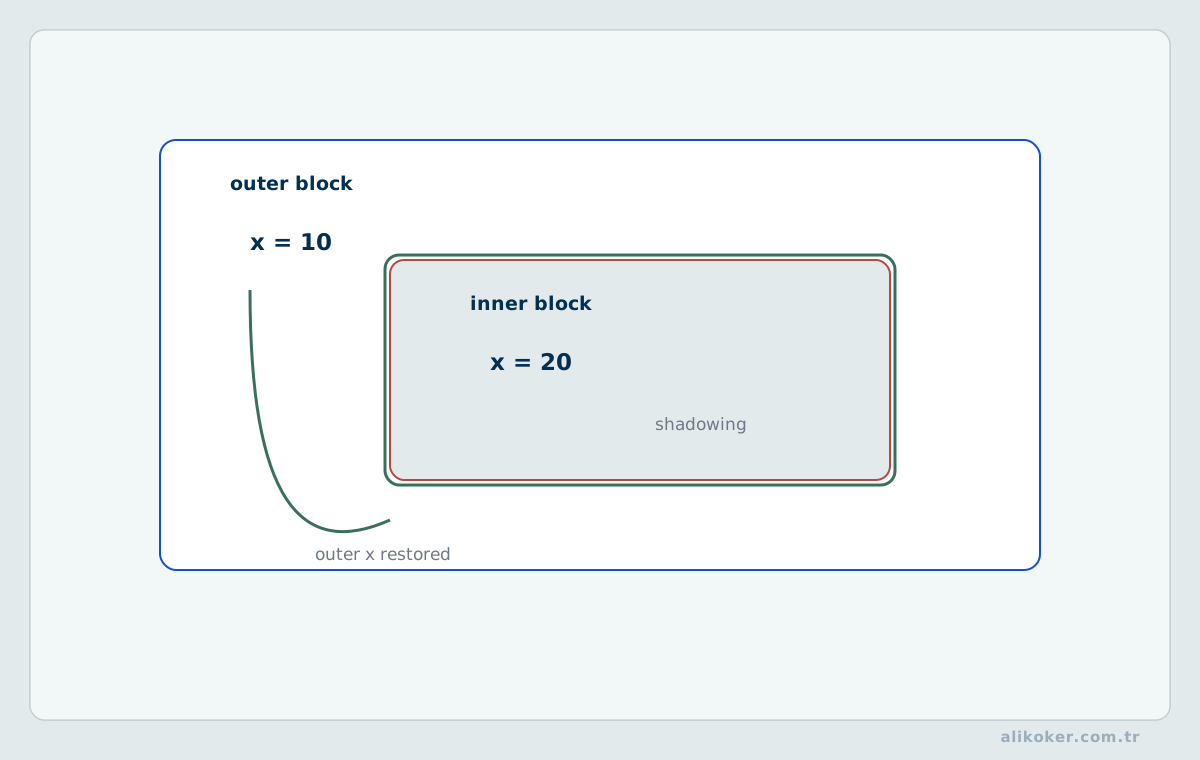
The basic execution unit of PL/SQL is the block.
Blocks appear in:
- anonymous blocks,
- stored procedures,
- stored functions,
- packages,
- triggers.
The core scope covers anonymous blocks, procedures, functions, and packages.
1.3. PL/SQL Program Structure
A basic block is:
DECLARE
    -- declarations
BEGIN
    -- executable statements
EXCEPTION
    -- error handlers
END;
/
DECLARE and EXCEPTION are optional when they are not needed. BEGIN and END delimit the executable part.
1.4. Executing Blocks
PL/SQL blocks can be executed from Oracle client tools. SQLPlus was the main interface in the original course context. SQLPlus remains usable, while SQLcl, SQL Developer and other clients can work with the same database engine.
The essential point is not the client application but the syntax and execution semantics of the SQL and PL/SQL sent to the server.
1.5. SQL and PL/SQL Files
SQL and PL/SQL commands can be stored in files and executed repeatedly. Compared with entering commands interactively, this supports:
- repeatability,
- version control,
- review,
- deployment automation.
1.6. Variables and Constants
PL/SQL variables are declared in the declaration section.
DECLARE
    v_name VARCHAR2(100);
    v_count NUMBER := 0;
BEGIN
    NULL;
END;
/
A constant can be declared as:
c_vat CONSTANT NUMBER := 0.20;1.7. Using SQL Statements in PL/SQL
SQL can be executed directly inside PL/SQL. When exactly one row is expected, SELECT ... INTO is commonly used:
SELECT NAME, SALARY
INTO v_name, v_salary
FROM EMPLOYEE
WHERE EMPLOYEE_NO = 100;
Cardinality matters. If the query returns no rows or more than one row, PL/SQL may raise an exception.
1.8. DML
Data modification statements execute in the current transaction context:
UPDATE EMPLOYEE
SET SALARY = SALARY * 1.10
WHERE DEPARTMENT_NO = 20;
1.9. Transaction Statements
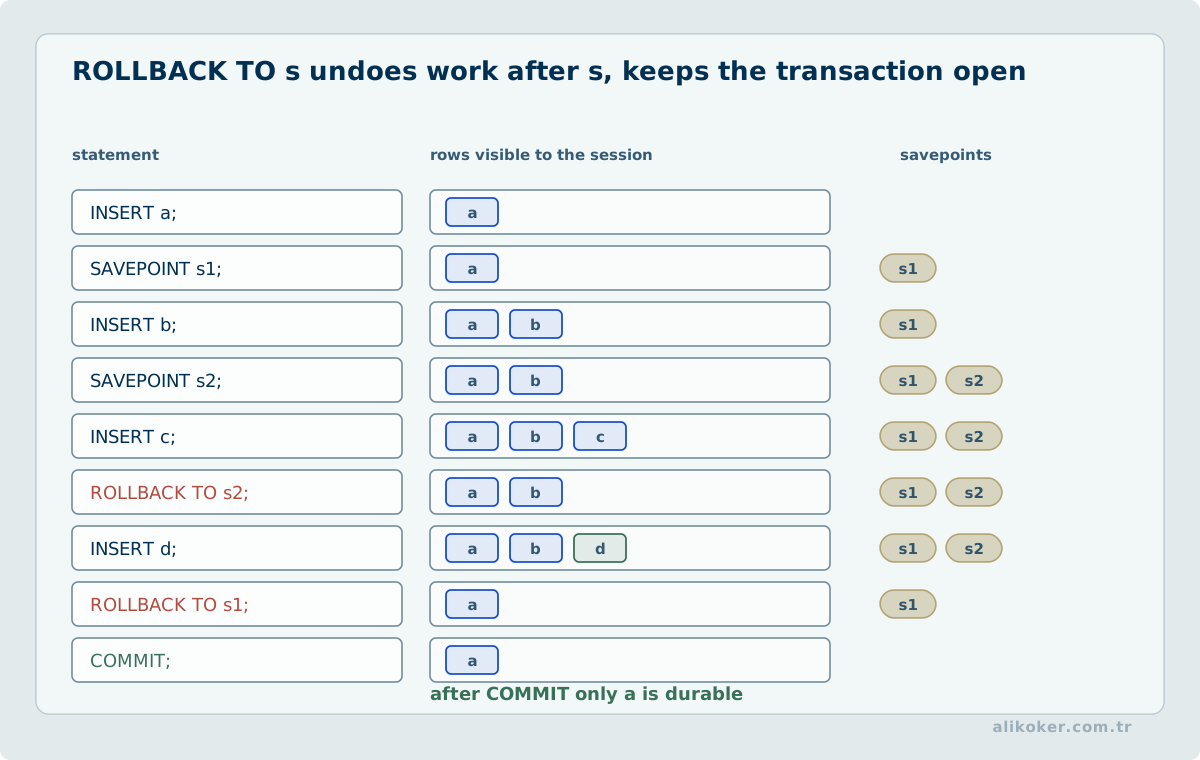
When required:
COMMIT;
ROLLBACK;
may be used. Whether a reusable stored procedure should commit on its own is an architectural decision. In many application designs, the caller owns the transaction boundary so that several database operations can succeed or fail as one unit.
1.10. Bind Variables
A bind variable separates the SQL structure from parameter values. Conceptually:
SQL structure + parameter valuesBind variables are important for:
- reducing SQL injection risk,
- reducing repeated parsing overhead,
- improving statement and plan sharing.
They are not a substitute for authorization or input validation, but they are the normal mechanism for supplying data values to parameterized SQL.
1.11. Declaration Section
The DECLARE section can contain:
- variables,
- constants,
- types,
- cursors,
- local subprograms,
- exceptions.
1.12. Default Values
A variable may be initialized with:
v_count NUMBER := 0;DEFAULT can also be used where the PL/SQL grammar permits it.
1.13. NULL Checks
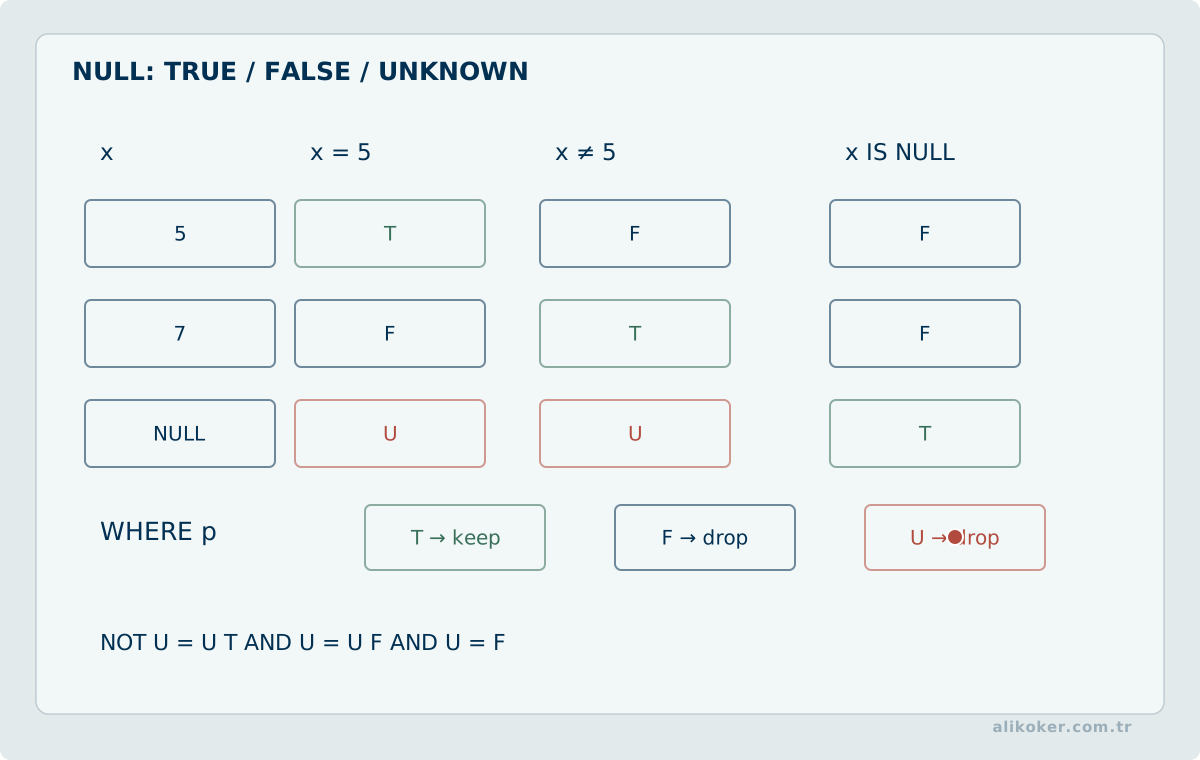
PL/SQL inherits SQL's three-valued logic where applicable. A null test should therefore use IS NULL rather than equality:
IF v_value IS NULL THEN
    ...
END IF;
1.14. %TYPE
%TYPE derives a variable's type from another declared object, commonly a table column:
v_salary EMPLOYEE.SALARY%TYPE;This reduces duplicated type declarations and helps PL/SQL code remain compatible when the column's declared type changes.
1.15. %ROWTYPE
%ROWTYPE represents the complete row structure of a table or cursor as a record:
v_employee EMPLOYEE%ROWTYPE;Fields can then be accessed as:
v_employee.NAME
v_employee.SALARY
1.16. Data Types
PL/SQL supports:
- numeric types,
- character types,
- date and time types,
- Boolean values,
- records,
- collections.
SQL and PL/SQL types are closely integrated, but not every PL/SQL type is valid as a SQL column type.
1.17. Expressions and Operators
PL/SQL provides arithmetic, comparison and logical operators. Conditions must be written with null semantics in mind; an expression involving NULL can evaluate to unknown rather than simply true or false.
1.18. Comments
Single-line comment:
-- commentMulti-line comment:
/*
  comment
*/
In production code, comments are most valuable when they explain intent, constraints or a non-obvious design reason rather than restating the syntax.
Unit 2: Control Flow
When constructing PL/SQL control flow, first identify which changes must complete as one logical transaction. Define the expected data state for each branch, and align rollback behavior with transaction boundaries. Exception handling should preserve meaningful failure information rather than merely suppressing errors. Exercise successful execution alongside failed validation and concurrent modification scenarios.
2.1. IF Statement
IF v_salary > 50000 THEN
    ...
END IF;
Multiple branches can be expressed with:
IF condition THEN
    ...
ELSIF other_condition THEN
    ...
ELSE
    ...
END IF;
2.2. ELSE Branch
ELSE defines the path taken when none of the preceding conditions is true.
2.3. Nested IF
An IF can contain another IF. Deep nesting, however, makes control flow difficult to reason about. Conditions and subprogram boundaries should remain as simple as the problem allows.
2.4. Basic LOOP
LOOP
    ...
END LOOP;
Without an exit path this loop is infinite.
2.5. Unconditional Exit
EXIT;terminates the current loop.
2.6. Conditional Exit
EXIT WHEN v_count >= 10;is often clearer than placing an IF containing EXIT inside the loop.
2.7. WHILE Loop
WHILE v_count < 10 LOOP
    v_count := v_count + 1;
END LOOP;
The condition is evaluated before each iteration.
2.8. FOR Loop
FOR i IN 1..10 LOOP
    ...
END LOOP;
This is convenient when iteration is over a known integer range.
2.9. Loop Labels
Labels can name nested loops so that an exit or reference can target the intended loop explicitly.
2.10. GOTO
PL/SQL supports GOTO, but structured constructs such as IF, CASE, loops and subprograms normally produce clearer code. A GOTO should therefore have a specific, defensible reason rather than being used as ordinary control flow.
Unit 3: Collections and Records
3.1. PL/SQL Tables and Associative Arrays
The historical term PL/SQL table is now generally discussed under associative arrays. A collection stores multiple values of the same element type under one variable.
Conceptually:
key -> value3.2. Declaring a Collection
DECLARE
    TYPE t_names IS TABLE OF VARCHAR2(100)
        INDEX BY PLS_INTEGER;

    v_names t_names;
BEGIN
    v_names(1) := 'Ali';
    v_names(2) := 'Ayse';
END;
/
3.3. Using Collections
Elements are read and changed through their indexes. Collections are useful for temporary sets of values manipulated inside PL/SQL.
3.4. Collection Methods
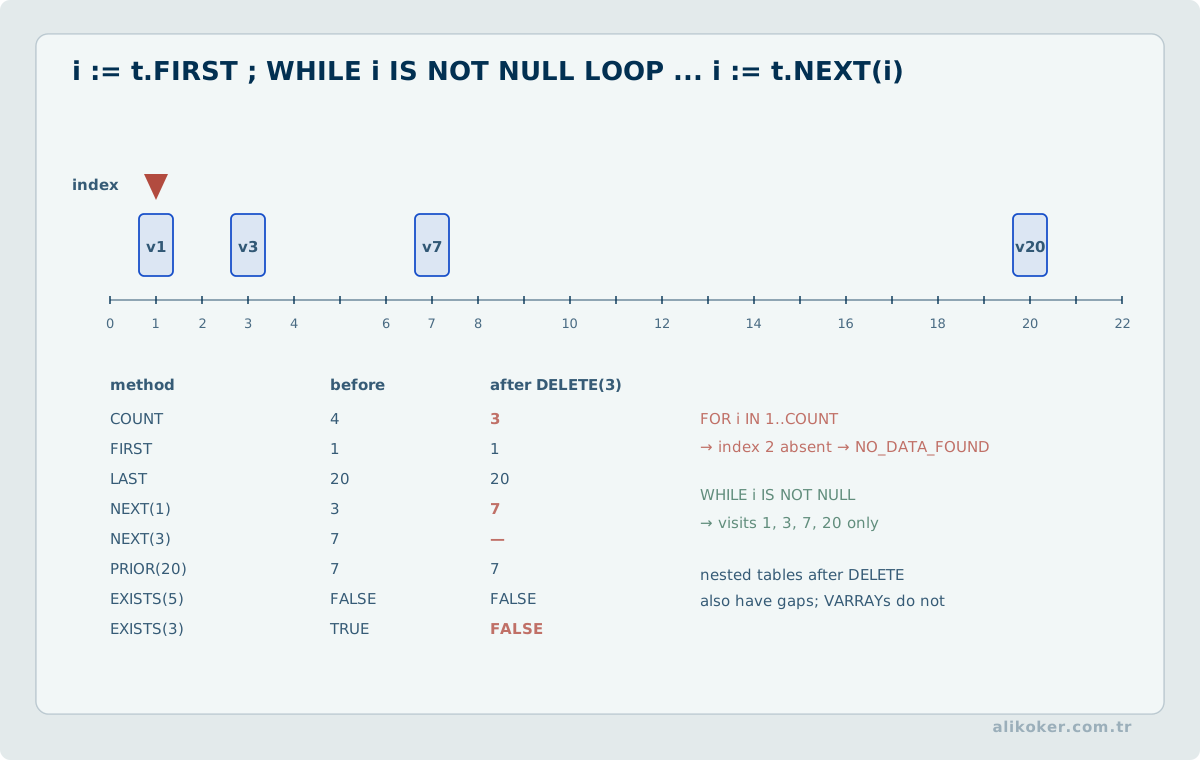
Common methods include:
COUNT,FIRST,LAST,DELETE,EXISTS,NEXT,PRIOR.
3.5. Element Count
v_names.COUNTreturns the number of existing elements.
3.6. First and Last Index
v_names.FIRST
v_names.LAST
return the current index boundaries. For sparse collections, assuming that every integer from 1 through COUNT exists is unsafe.
3.7. Deleting an Element
v_names.DELETE(2);can remove a particular element.
3.8. User-defined Records
A PL/SQL record groups fields of different types under one logical object:
TYPE t_employee IS RECORD (
    employee_no NUMBER,
    name VARCHAR2(100),
    salary NUMBER
);
3.9. Record Variable
v_employee t_employee;A field is accessed as:
v_employee.name3.10. %ROWTYPE with Records
Instead of manually duplicating all column declarations:
v_employee EMPLOYEE%ROWTYPE;can use the table's row definition directly. This improves type alignment with the schema, although application logic must still account for semantic schema changes.
3.11. Bulk Processing Across the SQL/PL/SQL Boundary
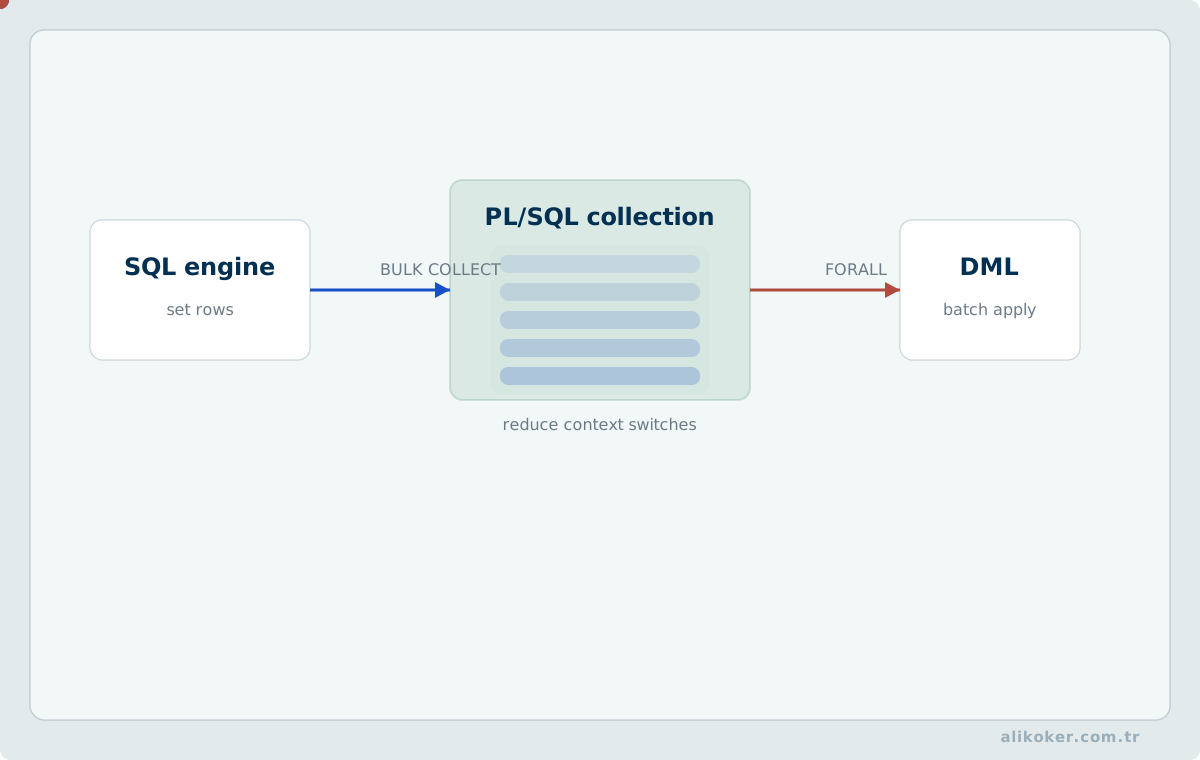
PL/SQL is effective when business rules must execute close to the data, but row-by-row SQL loops can create avoidable context-switch overhead between PL/SQL and SQL execution engines.
BULK COLLECT and FORALL can convert suitable workloads to batch processing. Batches should still be bounded so PGA memory remains predictable.
Error behavior must be designed explicitly: fail the whole batch, isolate failed rows, or permit partial success. That choice is a data-integrity contract rather than an exception-handling detail.
3.12. Set-Based Design and Queue Effects in PL/SQL Workloads
In data-intensive systems, reliability, scalability, and maintainability are different consequences of the same design decisions. PL/SQL performance cannot be evaluated from the procedure body alone; index and access paths, datatype conversions, transaction scope, bulk-processing strategy, and interaction with remote or partitioned objects all contribute to the cost of the executed statement. Derived data should have an explicit source of truth, reproducibility path, and latency budget.
- Measure context-switch cost between row-by-row execution and set-based SQL.
- Evaluate lock-wait chains and recovery cost of long transactions.
- Observe undo/redo and memory pressure while increasing bulk-operation throughput.
Unit 4: Cursors
This unit describes the cursor lifecycle of declaration, opening, fetching, row processing, and closing when row-oriented logic is genuinely required.
declare
  |
  v
OPEN -> FETCH -> row available? --yes--> process -> FETCH
                    |
                   no
                    |
                    v
                  CLOSE
Before choosing a cursor, determine whether the operation can be expressed as set-based SQL. If row-wise handling is necessary, evaluate per-row access cost, memory demand, and failure impact. When using bulk fetch or bulk DML, define how individual failures will be reported. Measure how runtime and resource use grow with data volume, not just whether the loop produces correct results.
4.1. Cursor Concept
A cursor is PL/SQL's mechanism for processing the rows of a SQL result set. SQL should remain set-oriented whenever possible; a cursor is appropriate when business logic genuinely requires row-by-row handling.
4.2. Implicit Cursors
Oracle automatically manages implicit cursors for DML and relevant SQL operations. Their state can be inspected through attributes such as:
SQL%FOUND
SQL%NOTFOUND
SQL%ROWCOUNT
SQL%ISOPEN
4.3. Explicit Cursors
An explicit cursor can be declared for controlled iteration over a multi-row result:
CURSOR c_employee IS
SELECT EMPLOYEE_NO, NAME, SALARY
FROM EMPLOYEE
WHERE DEPARTMENT_NO = 20;
4.4. Cursor Lifecycle
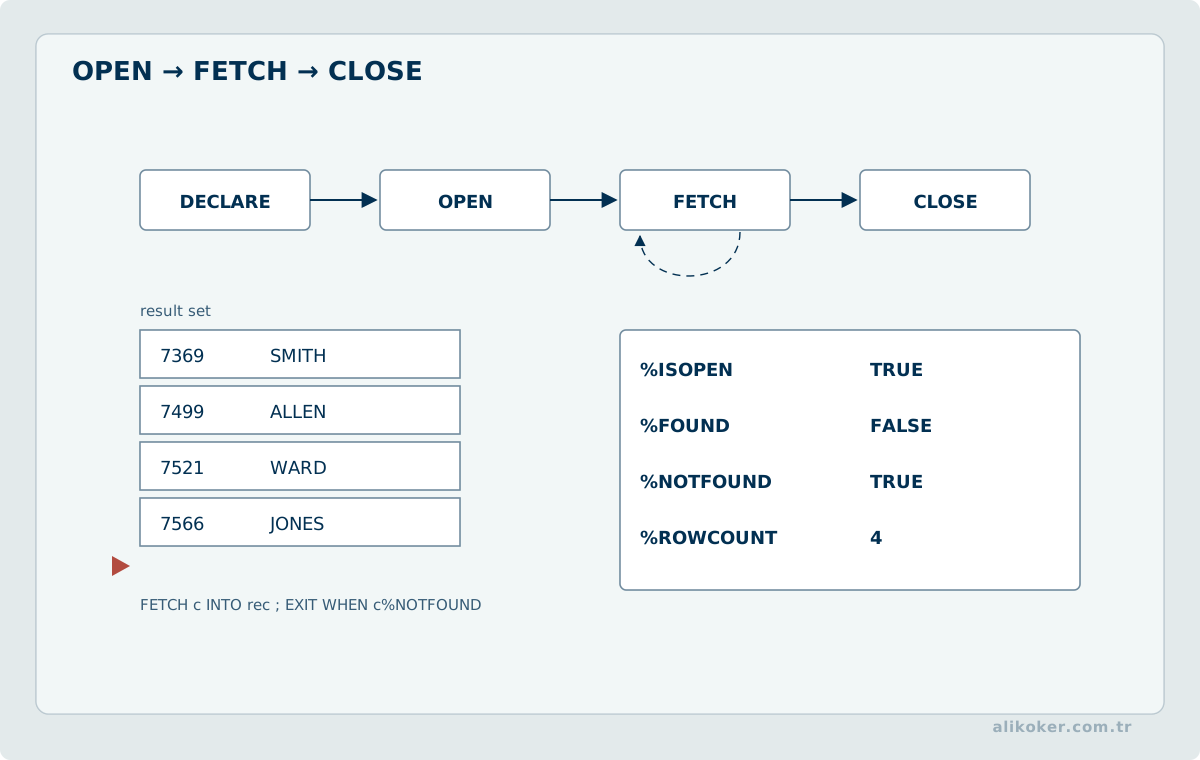
The classic explicit-cursor sequence is:
- declare,
- open,
- fetch,
- close.
4.5. Opening
OPEN c_employee;prepares the cursor's execution context.
4.6. Fetching
FETCH c_employee
INTO v_employee_no, v_name, v_salary;
Each FETCH requests the next row.
4.7. Closing
CLOSE c_employee;releases the cursor resources associated with the open cursor.
4.8. Cursor Attributes
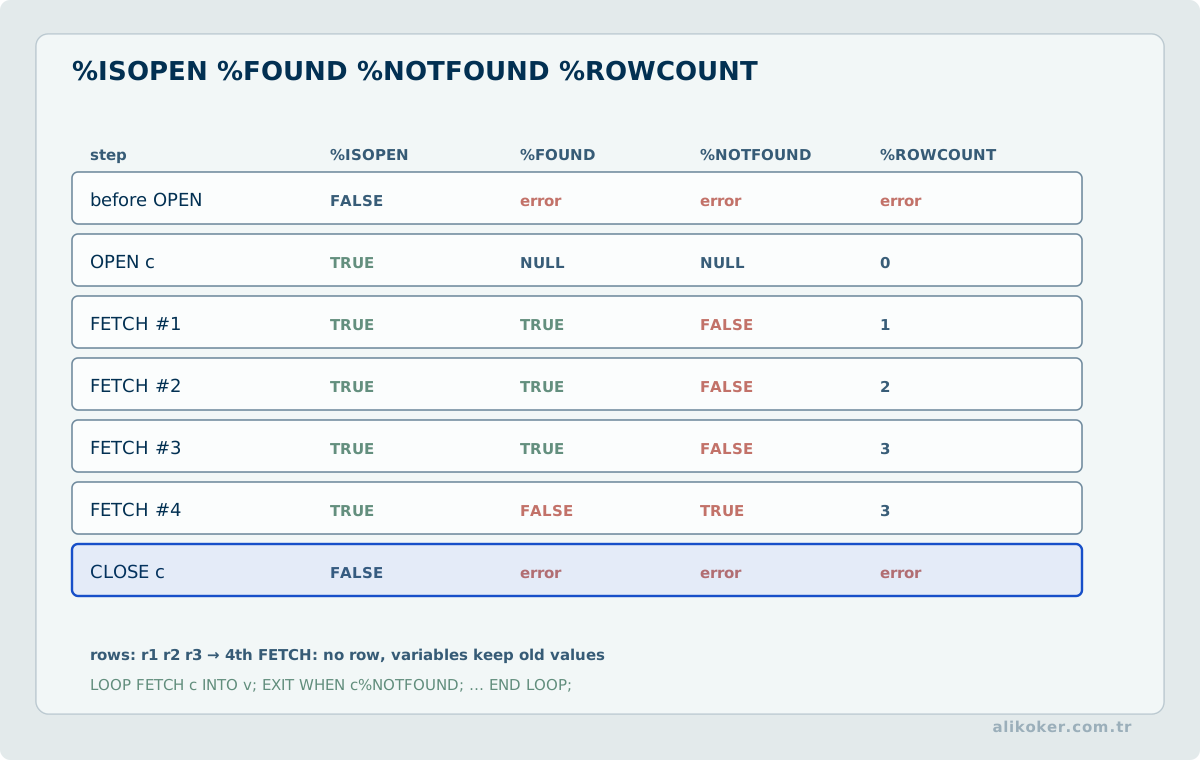
An explicit cursor provides attributes such as:
c_employee%FOUND
c_employee%NOTFOUND
c_employee%ROWCOUNT
c_employee%ISOPEN
4.9. Cursor Row Records
The cursor's row shape can be represented through %ROWTYPE:
v_row c_employee%ROWTYPE;4.10. Cursor FOR Loop
PL/SQL can manage opening, fetching and closing automatically:
FOR r IN (
    SELECT EMPLOYEE_NO, NAME
    FROM EMPLOYEE
    WHERE DEPARTMENT_NO = 20
) LOOP
    ...
END LOOP;
For simple iteration this is usually safer and less error-prone than manually managing OPEN, FETCH and CLOSE.
4.11. Parameterized Cursor
CURSOR c_employee(p_department_no NUMBER) IS
SELECT EMPLOYEE_NO, NAME
FROM EMPLOYEE
WHERE DEPARTMENT_NO = p_department_no;
The same cursor definition can then be reused with different parameter values.
Unit 5: Exception Handling
This unit shows how runtime failures transfer control to exception handlers while transaction completion remains an explicit application policy.
DML / operation
   |
   v
failure? -------- no --------> normal flow
   |
  yes
   |
   v
EXCEPTION handler
   |
   +--> add context / translate
   +--> compensate
   +--> keep COMMIT or ROLLBACK policy explicit
5.1. Exception Mechanism
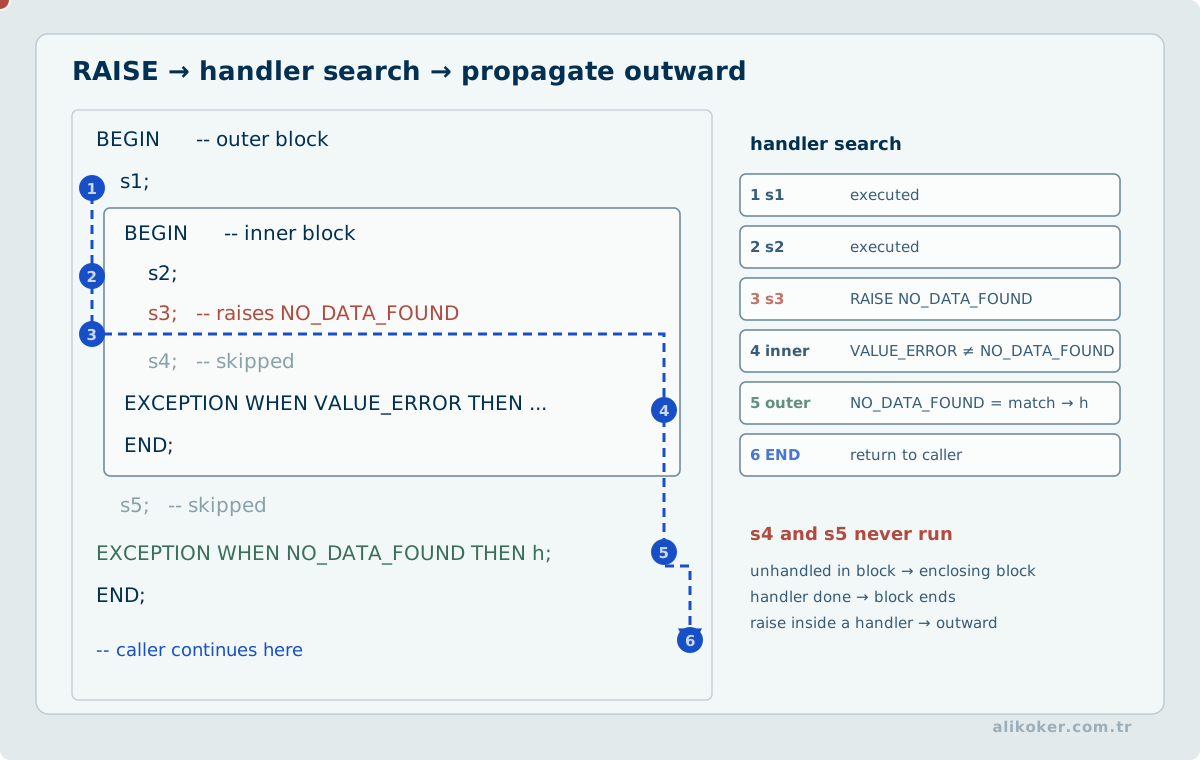
PL/SQL handles runtime errors through exceptions. When an exception is raised, normal execution of the current block stops and control transfers to a matching handler in the EXCEPTION section.
BEGIN
    ...
EXCEPTION
    WHEN ... THEN
        ...
END;
/
Error handling is part of correct database programming, not an optional afterthought.
5.2. Predefined Exceptions
Oracle exposes a number of common error conditions as named exceptions, including:
NO_DATA_FOUND,TOO_MANY_ROWS,ZERO_DIVIDE,DUP_VAL_ON_INDEX.
Example:
EXCEPTION
    WHEN NO_DATA_FOUND THEN
        ...
5.3. Non-predefined Server Errors
An Oracle error number that does not already have a convenient predefined PL/SQL name can be associated with a user-declared exception using PRAGMA EXCEPTION_INIT.
5.4. Error Codes and Messages
Inside an exception context:
SQLCODE
SQLERRM
provide the numeric code and message text. They can be useful for logging and for translating low-level database failures into an application's error model.
5.5. User-defined Exceptions
DECLARE
    e_invalid_salary EXCEPTION;
BEGIN
    IF v_salary < 0 THEN
        RAISE e_invalid_salary;
    END IF;
EXCEPTION
    WHEN e_invalid_salary THEN
        ...
END;
/
Domain rules can therefore be represented as explicit exceptions rather than as unexplained control-flow failures.
5.6. Exceptions and Transactions
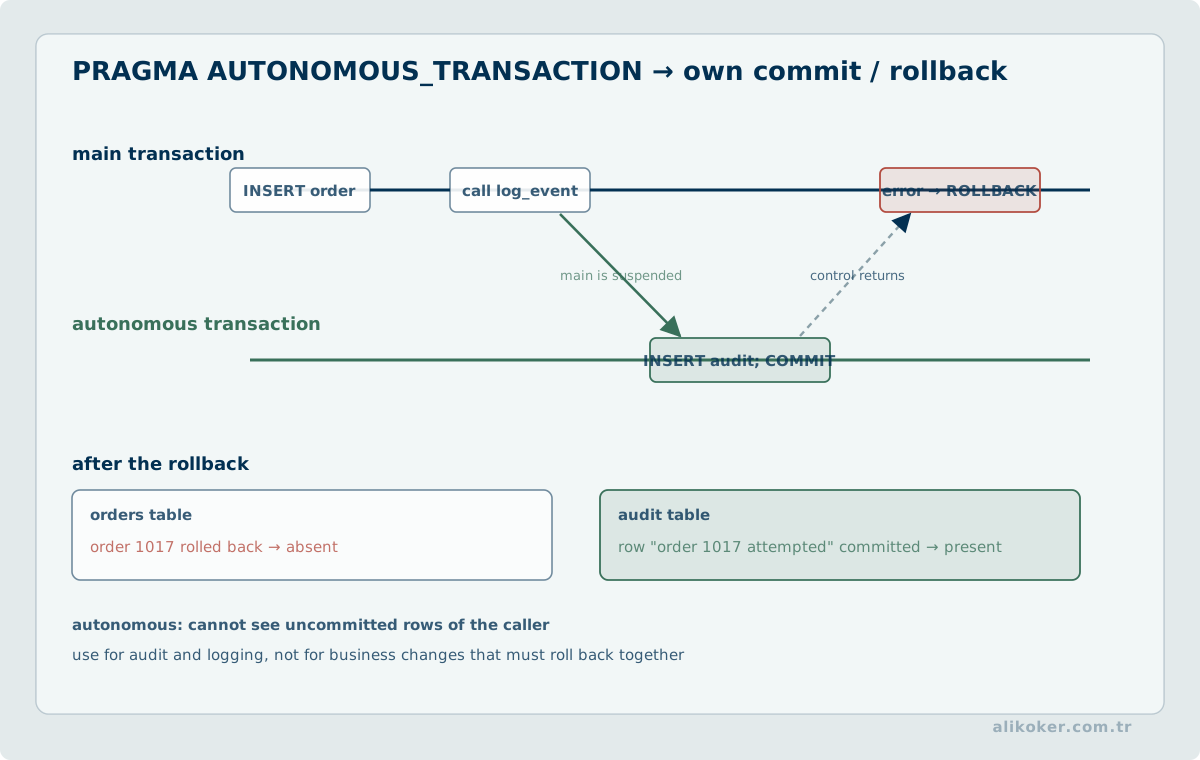
Catching an exception does not automatically produce the desired transaction outcome. The design must decide:
- which changes should be rolled back,
- which layer owns commit or rollback,
- whether the error should be re-raised,
- what information is safe and useful to log.
This distinction becomes important when several procedure calls participate in one larger unit of work.
Unit 6: Subprograms
This unit separates the public contract in a package specification from implementation details and private routines in the package body.
calling code
    |
    v
package specification
    |
    +--> public procedure / function contract
    |
    v
package body
    |
    +--> implementation details
    +--> private routines / state
6.1. Subprogram Concept
Reusable named PL/SQL blocks are subprograms. The two basic kinds are:
- procedures,
- functions.
Subprograms can:
- reduce duplicated code,
- centralize database logic,
- provide an authorization boundary,
- establish a stable API between applications and database internals.
6.2. Common Structure
A subprogram can contain:
- a name,
- parameters,
- declarations,
- an executable section,
- an exception section.
6.3. Procedures
A procedure performs an operation:
CREATE OR REPLACE PROCEDURE UPDATE_SALARY (
    p_employee_no IN NUMBER,
    p_new_salary IN NUMBER
) AS
BEGIN
    UPDATE EMPLOYEE
    SET SALARY = p_new_salary
    WHERE EMPLOYEE_NO = p_employee_no;
END;
/
6.4. Local Procedures
A procedure can be declared inside another PL/SQL block when it is only needed locally. This is useful for decomposing a larger block without creating a schema-level object.
6.5. Stored Procedures
A schema-level procedure is compiled and stored as a database object. Multiple application components can call the same implementation if the interface is appropriate for shared use.
6.6. Calling Procedures
From PL/SQL:
BEGIN
    UPDATE_SALARY(100, 75000);
END;
/
Client drivers provide their own callable-statement mechanisms for invoking stored procedures.
6.7. IN, OUT and IN OUT Parameters
IN supplies an input value.
OUT allows the procedure to return a value through a parameter.
IN OUT allows both input and output.
Parameter direction is part of the interface contract and should be explicit rather than surprising to the caller.
6.8. Functions
A function returns a value:
CREATE OR REPLACE FUNCTION ANNUAL_SALARY (
    p_monthly_salary IN NUMBER
) RETURN NUMBER AS
BEGIN
    RETURN p_monthly_salary * 12;
END;
/
6.9. Stored Functions
A schema-level function is a database object. Under the applicable Oracle rules it can also be called from SQL expressions. Side effects, purity expectations and SQL-call restrictions must be considered when a function is intended for use inside SQL.
6.10. Packages
A package groups related PL/SQL declarations and implementations under one schema object. It can contain:
- types,
- constants,
- variables,
- cursors,
- exceptions,
- procedures,
- functions.
6.11. Package Specification
The package specification is the externally visible interface:
CREATE OR REPLACE PACKAGE EMPLOYEE_API AS
    PROCEDURE UPDATE_SALARY(
        p_employee_no IN NUMBER,
        p_new_salary IN NUMBER
    );

    FUNCTION ANNUAL_SALARY(
        p_monthly_salary IN NUMBER
    ) RETURN NUMBER;
END EMPLOYEE_API;
/
6.12. Package Body
The package body contains the implementation of the declared subprograms:
CREATE OR REPLACE PACKAGE BODY EMPLOYEE_API AS

    PROCEDURE UPDATE_SALARY(
        p_employee_no IN NUMBER,
        p_new_salary IN NUMBER
    ) AS
    BEGIN
        UPDATE EMPLOYEE
        SET SALARY = p_new_salary
        WHERE EMPLOYEE_NO = p_employee_no;
    END;

    FUNCTION ANNUAL_SALARY(
        p_monthly_salary IN NUMBER
    ) RETURN NUMBER AS
    BEGIN
        RETURN p_monthly_salary * 12;
    END;

END EMPLOYEE_API;
/
The specification/body split separates the stable interface from implementation detail.
6.13. Using Packages
A package member can be called as:
EMPLOYEE_API.UPDATE_SALARY(...)Packages are useful for placing related database operations under one namespace rather than exposing a large collection of unrelated schema-level procedures.
6.14. Design Value of Packages
A well-designed package:
- hides internal implementation details,
- exposes a narrow API,
- promotes reuse,
- allows privileges to be granted at a meaningful boundary,
- groups related operations together.
As a database programming layer grows, coherent package boundaries can reduce coupling and maintenance cost compared with an unstructured collection of independent procedures.
Unit 7: Triggers, Dynamic SQL, and the Privilege Model
PL/SQL subprograms define reusable logic. Triggers, dynamic SQL, and execution privileges determine when that logic runs, which SQL it can construct, and under whose authority it executes.
7.1. Trigger Boundaries
A trigger is a stored program unit invoked automatically by a DML or system event. A row-level trigger may execute once for each affected row, while a statement-level trigger executes once for the statement.
Hidden side effects make trigger-heavy designs difficult to reason about. If an UPDATE silently modifies unrelated tables, the transaction contract can no longer be understood from the calling code alone. Triggers are therefore best reserved for narrow cases such as:
- database-level invariants that cannot be expressed declaratively,
- explicit auditing or technical metadata,
- boundaries that must not be bypassed by application code.
They should not become an invisible service layer for ordinary business workflows.
7.2. Dynamic SQL
When object structure or the statement itself must be selected at runtime, native dynamic SQL can be used:
EXECUTE IMMEDIATE sql_text
USING bind_value;
Data values should be passed through bind variables wherever possible. Object identifiers cannot normally be bound in the same way; dynamic identifiers require explicit validation and allow-listing.
Dynamic SQL introduces two distinct risks:
- injection through unsafe text construction,
- object and type errors that are no longer visible at compile time.
Static SQL should remain static when the statement shape is known.
7.3. Definer and Invoker Rights
The privilege context of a stored program is a security boundary. Under a definer-rights model the unit executes with the authority associated with its owner; under invoker rights the caller's execution context plays a stronger role.
The choice should follow least privilege, the objects that must be reached, and the complete call chain rather than convenience alone.
7.4. Package State and Sessions
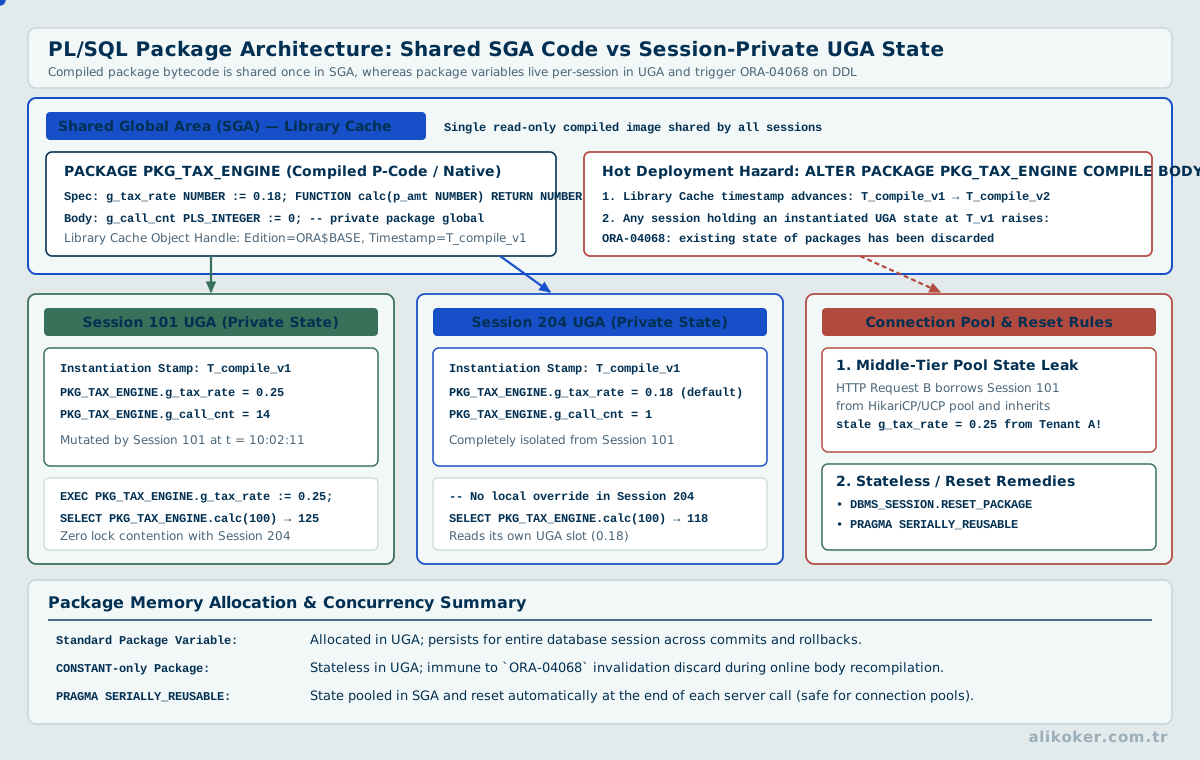
Package globals may persist for the life of a database session. In applications that use connection pools, a logical user request and a physical database session are not the same thing. Residual package state can therefore become hidden cross-request context.
A safer default for critical services is:
request input
   +
persistent data
   ->
result
Session state should be introduced only when its lifecycle and isolation are explicit.
7.5. Dependencies and Invalidation
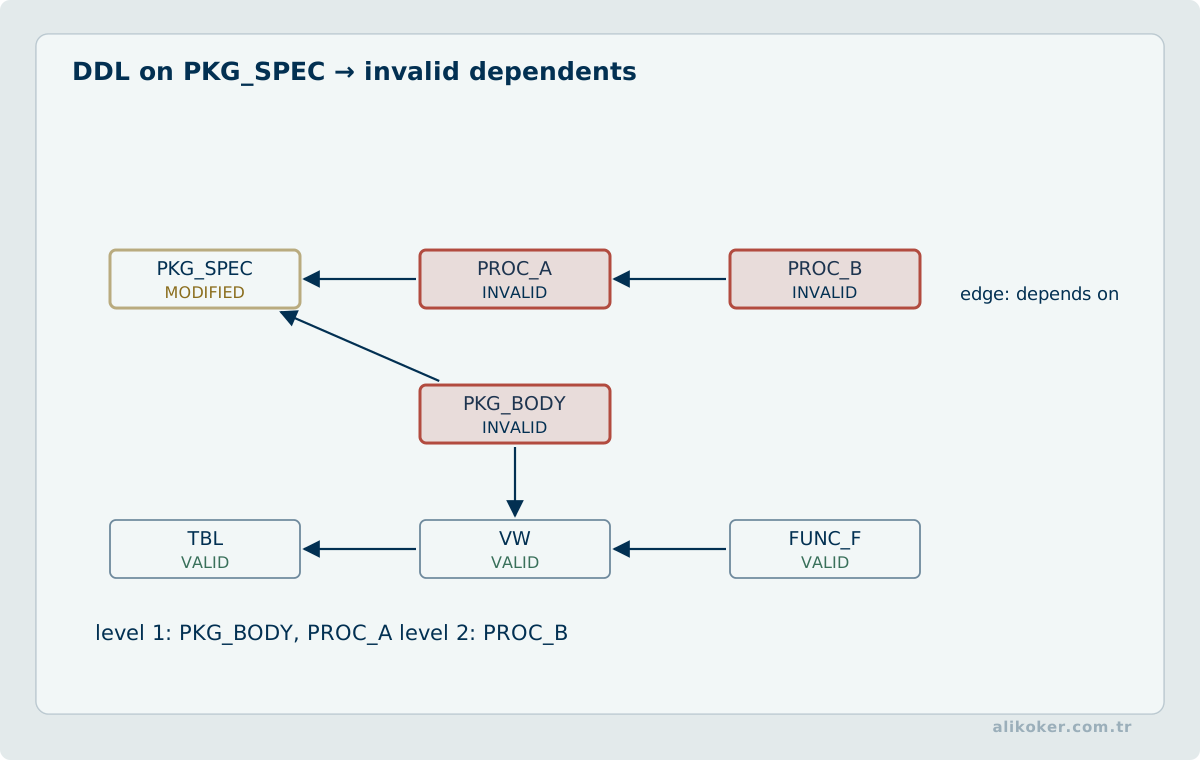
Changing the signature of a package, view, or referenced type can invalidate dependent PL/SQL units and require recompilation. A schema deployment is therefore not complete merely because its DDL succeeded; the dependency graph and the behavior of the first runtime call also belong to the release contract.
7.6. Tying PL/SQL Behavior to the Oracle Contract
PL/SQL examples should consider language semantics, SQL-engine behavior, and session/transaction state together. COMMIT, ROLLBACK, exceptions, and autonomous transactions affect data visibility and failure boundaries, not just syntax.
Bulk-processing claims should be measured using row counts, batch size, PGA use, and SQL-call counts. BULK COLLECT and FORALL are not universally better; workload size and error semantics matter.
Production code should avoid patterns that silently swallow errors, such as WHEN OTHERS THEN NULL. It should be explicit whether an exception is logged, translated, or re-raised, and where the transaction is completed.
References
- Brendan Gregg. Systems Performance: Enterprise and the Cloud. Pearson Education, 2014.
- Martin Kleppmann. Designing Data-Intensive Applications. 1st ed. O’Reilly Media, 2016.
- Oracle. Oracle Database PL/SQL Language Reference, 12c Release 1 (12.1). Oracle, 2013. Source
- Steven Feuerstein; Bill Pribyl. Oracle PL/SQL Programming. O'Reilly Media, 2014.